So I discovered that Engine OS was not comfortable with deep file tree (call it a bug or a “software limitation”), where Virtual DJ is not comfortable with folders having too many subfolders (because they are long to be displayed and scrolled in browser.
I need to elaborate a new way of organizing all my whole library that fits both constraints, so here your feedbacks will be warmly welcome! Please share!
Then I need to find a routine, without third-party software please (like Mixxo or Lexicon) for adding new files in both libraries, that would be something like:
Get new tracks
Tag them with genre, art, blahblah (I’m doing this with SongKong)
Then: have them discovered by both software – this is no issue with VDJ than can scan very quickly whatever file organization you have, but remains a mystery for me in Engine DJ)
Then compare BPM, beat grid, and fix if necessary here and there…
As you understand: the 3rd step is delicate. If I move the file in my library with one software, the other one will lose the track… So new files must be smartly located somewhere consistent with my (new) file organization AND the way Engine OS discovers new tracks…
Thanks!
This is the point: I can’t, because my (weird?) structure creates A LOT of subfolders that Engine DJ cannot digest!!! So I need to find some alternative.
(I’m having ≈46,000 tracks in ≈31,000 folders. I was happy with that in Virtual DJ.)
This is why I’m asking for fellow advice, to take profit of their experience rather than reinventing the wheel
I’ve asked “Le Chat” (an AI ) to propose me another file organization taking into account VDJ and EDJ constraints, and part of my expectations.
I’m sharing its answer (after third iteration because there were issues in the 2 first): this could fit my needs, so I’ll give this a try.
Why not with third party software? It’s by far the best way to do it. Lexicon library conversion is free now. I’d just pick one program to be the main source of truth where you do all editing and organization, then use Lexicon to copy it over to the other.
My library is reorganized. Yet, it was hosted in one Sandisk 2Tb external SSD drive, and I had time-out / lag issues with it, leading to some software issues in Virtual DJ.
My SDD was changed once (NB: Sandisk support is very pro ), but after reinstalling my library, the issue was still here, and I lost important playlists I had to recreate (Lexicon backup was helpful, as a reference, but I had to repopulate my playlists manually).
Eventually, Sandisk re-replaced my SSD with another one, “pro”, and so far it seems to work as expected
And I changed my computer, too!!!
All of this has prevented me from addressing the initial problem mentioned here. I will resume my tests with Virtual DJ, Lexicon, and Engine, but with lower expectations for the standalone part, now that my PC + SSD platform seems more powerful and reliable.
What I do is keep the same file structure used for VDJ on the SSD and create the Engine DB directly on the drive. It’s easier for syncing new files etc. Also any VDJ lists created can be imported to engine via iTunes so they can be used on the standalone side too. I don’t use Lexicon at all so just set the cue points and beatgrid on Engine separately. I don’t process a huge amount of new tracks so that method works for me.
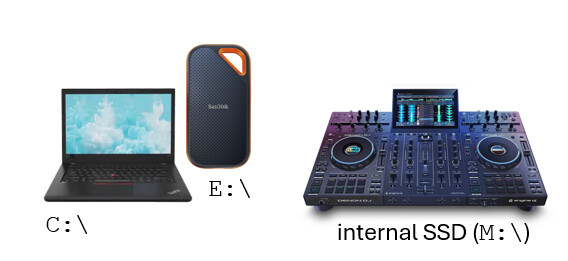
I’d like to make sure I understood well, because your solution looks appealing and adapted to my situation. I’m assuming you have more or less the same “devices” than mine, which are : a computer, an external SSD for your music, and a controller with an internal SSD.
I named the drives for what will follow, but this has no importance.
What I understood (please correct or complete if I’m wrong):
Initially:
You have your music library on E: working fine with VDJ
You make a full copy of E: to M:
When it comes to Engine DJ, you connect the controller to your Mac/PC, and you don’t make it work with local drive but directly on M: (not sure how you prevent Engine to create its DB locally?)
When adding new tracks:
You put them on both drives and let VDJ / Engine add it to their own DB, and you check the beatgrids on both pieces of software
You have no sync of playlist but with iTunes (I’m not in Apple ecossytem, so I guess Lexicon can do the trick for me instead)
Or: do you have one sole drive that is external, and connect it either on computer or on controller?
All the media files on my laptops are on a secondary partition D. When I use the SSD or SD card to sync the files it is recognised as E drive but that doesn’t matter.
Once the files are on the external drive they get dragged in to an empty playlist in Engine to be analyzed, beatgrid set etc.
Engine probably creates a local database, but that doesn’t matter as the one you are using is on the external drive itself.
If you have a main and backup SSD/SD you can just sync the files from the main laptop then copy over the Engine Library folder.
Because the files are in the same order, a playlist you create in VDJ will also work in Engine, similarly you can export a m3u history file from Engine and copy it back to the VDJ history folder and it will be read although not in the correct play order.

 ) to propose me another file organization taking into account VDJ and EDJ constraints, and part of my expectations.
I’m sharing its answer (after third iteration because there were issues in the 2 first): this could fit my needs, so I’ll give this a try.
) to propose me another file organization taking into account VDJ and EDJ constraints, and part of my expectations.
I’m sharing its answer (after third iteration because there were issues in the 2 first): this could fit my needs, so I’ll give this a try. ), but after reinstalling my library, the issue was still here, and I lost important playlists I had to recreate (Lexicon backup was helpful, as a reference, but I had to repopulate my playlists manually).