Transferring files to System One internal drive painfully slow

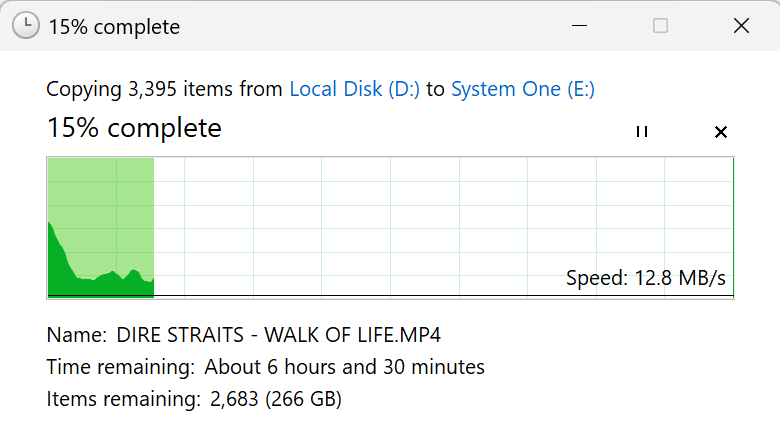
Just installed a 1tb Crucial SATA drive and it’s taking forever to transfer my video files. Speed will peak at say 200mbps for a few seconds then idle along at 12mpbs for ages.

In comparison I can transfer the same folder to my Samsung T7 in about 7 minutes.

Is this a limitation of the internal storage on the controller or just the SATA drive itself?

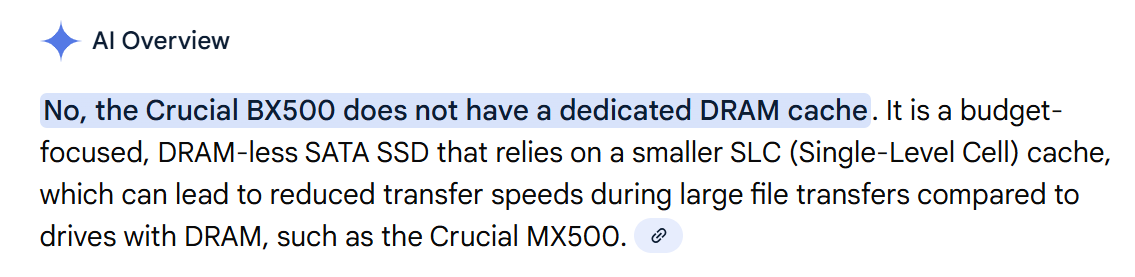
Which Crucial model is it? Some models in the BX series don’t have DRAM cache; that could be one explanation.

Is this your first internal hard drive device? The cable makes a huge difference to the speed. On older ones it’s the thicker USB-B cable (the one looks like a type A and micro usb stacked) that you need to get the speed.

In your case I’d find a thunderbolt 4 type USB-C cable to facilitate the speed, oh and check if one of your MacBook ports is faster than the other, and remove any hubs etc out of the chain.

It’s a Crucial BX500 so that probably explains it. Thank you!

Im on Windows and using the blue USB C cable supplied with the controller.

2 Likes

Does it have any specs on the cable sleeve? And does your windows machine have any specs for the ports?

So this could perhaps be related to the lack of DRAM cache on this model.

Does the diagnostic page data show the temperature of this SATA SSD during the transfer?

SSDs, whether SATA (or even NVMe), are quite known for their speeds dropping significantly as soon as they overheat during write operations.

It’s probably just the fact it’s a budget drive (although £120 for 1tb isn’t really budget money ways). Once the initial write is done I’ll only be updating it incrementally so no biggie.

Thanks for all your help.

1 Like

I use a WD Blue in mine and it’s ultra quick, wasn’t too expensive either when I bought it.

Prices have literally doubled lately.

It should easily manage 300 to 470 MB/s. This drive too.

USB hub? Try a different port on the laptop.

It seems that the rise in RAM prices is in turn driving up SSD prices again.

And to think I bought an Acer Predator GM7000 2TB NVMe for my desktop PC during the last Black Friday sale on Amazon Spain for under €100.

I’m so glad I took advantage of that offer at the time.

Yeah I just looked, crazy, my 250gb WD Blue cost me about 35 quid.

I think it’s just the type of drive, apparently because of the way it works it slows down to ridiculous speeds writing large files.

Once the data is on there it’ll be fine for reading.

It’s NOT the drive!!

I have the exact same drive in my P4+

and I get write speeds of at least 350 MB/s, sometimes over 400 MB/s.

Same cable, and even a hub in between, which is also connected to the computer via a USB-A cable.

But I’m writing video files approx 100mb to 200mb in size. Audio files will transfer far quicker.

Just tested for you… File size approx. 870MB is written at a constant 356MB/s.

Also my Audfiles with aprox 24mb writen with min 350mb/s When i Format ist and write komplete New with the sync from EngineDJ its slow down only for writing the Folders to 27mb/s That needs regulary 2 Minutes then it speeds up. It doesn’t matter whether the source is my desktop computer or the tiny handheld I take with me when I have Gigs with VDJ. It’s an AMD something-or-other… gaming handheld, basically. The Big one 13900k…

I’d suspect a driver/USB connection issue. I can’t imagine this drive failing specifically because of the better hardware. I bought mine on November 25th from Amazon. So it’s still current.

Try connecting the drive directly to the computer, if you have one. Or use a USB-C to SATA adapter.
My It’s formatted in exFAT.

This topic was automatically closed 24 hours after the last reply. New replies are no longer allowed.