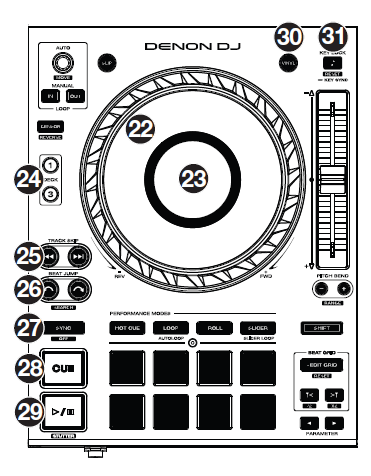
I found that the pitch control sometimes appears to be like freezed and not responding on the Denon SC6000. To solve this issue I have found that the solution for that works again is slide the pitch control to one of the extremes, and then seems that the pitch control works again, but this is a big trouble when you are in the mix.
and don’t can be solved in futures firmware updates?
If its normal use is like this, the reality is that it makes mixing very difficult when using the double layer. It completely ruins the dynamic of the mix.
The only way around it is not to use auto sync or layers - the pitch control can’t move itself to the pitch number that the unit picked to achieve the mix
I never use the sync, but I use dual layer because is a great improvement vs. the other players, but if the normal use means the the pitch always appears freezed…
I don’t think it is the most appropriate way to do a mix, we would have to find a solution so that this does not happen
It’s been like this on pitch controls since year 2000, if not before that and it really is easy to use. I appreciate you feeling hostile or at least a little affronted, as this is the first you’ve heard of it, but it really is intuitive
avoiding tremendous deviations in beatmatching, I detach “Sync” for all platters, which speed I don’t want to modify., before I start beatmatching with the next track. Otherwise all tracks will start to change their speed and it may be strange, depending on the percentage of your “Pitch Bend Range”.
Next step I’ll do, is to draft the speed (BPM) of the following track. After drafting, I switch on “sync” again.
II think this is an useful procedure, especially if I mix on more than two decks.