fixed, in fact I have to use c: drive and not z: or any other drives I have created through winecfg
That’s a permission issue.
You only can access to files with your user privileges, because wine is launched with that permissions.
If you click on folder icon on the top left, you only can see two drives. C: and Z:
Inside C:, you can browse the files to your home folder. From there, you can add tracks to any playlist.
If you have your tracks in another drive, you can link them inside your home folder. After that you will browse, drag and drop your tracks to the playlist.
Hope this will be usefull.
I’ve been trying (and failing) to get this working in bottles and I’m starting to lose hope for an easy way to do this 
The main issue being the Audio Device issue described. I’ve tried the scripts suggested in the thread and still no luck.
The ideal scenario would be to create a bottles installer that will just do this for people (with all of the workaround scripts for audio etc included).
I’m close to the point of giving up and just getting a cheap laptop off ebay for the sole purpose of running windows on it for Engine DJ. It’s a bit depressing really, but I just feel like I’m spending more time attempting to run Engine on Linux than actually learning to DJ.
I really wish InMusic would at least entertain the idea of creating a Linux version, but I just don’t think it’s going to happen.
Any last ditch attempts I should try?
Hi BrotherKaif.
I do not use Bottles to start Engine DJ software.
I run it directly with wine.
Depending of your Linux distribution, you can install wine-stable package or wine-devel package.
After that, install winetricks package. This program can be used to configure audio environment in wine.
Here you have screenshots of process:
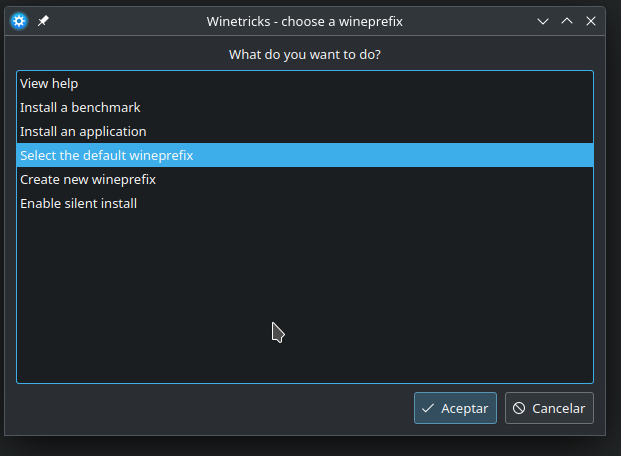
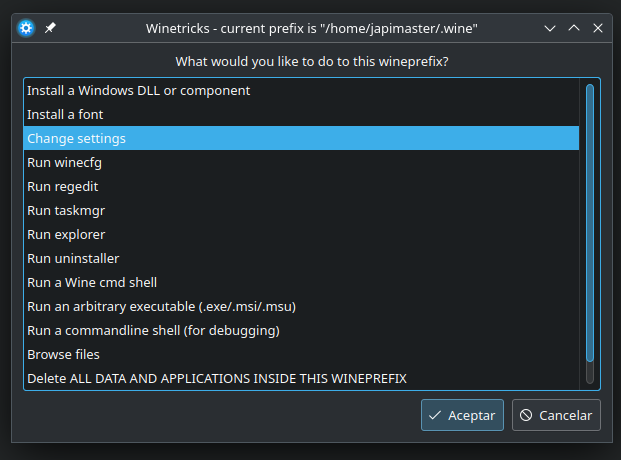

You must select ALSA driver or PULSEAUDIO driver.
Test both to see which is better for you.
After that, use the folowing script to start Engine DJ software. Create a file Run_Engine.sh and set execution permision on.
#!/usr/bin/env sh
wine cmd /c start REG DELETE ‘HKLM\Software\Microsoft\Windows\CurrentVersion\MMDevices\Audio\Capture’ /REG:64 /F
wine cmd /c start REG DELETE “HKLM\Software\Microsoft\Windows\CurrentVersion\MMDevices\Audio\Render” /REG:64 /F
wine “C:\Program Files\Engine DJ\Engine DJ.exe”
Double clic on Run_Engine.sh file. EngineDJ software should open.
That’s all. This way, it should run well with audio enabled.
Good luck. Regards.