Hi All,
I’m trying to connect SS to the Denon hardware so I can send scripts over with the tracks. I have the Prime 4+ and all software is up to date.
I have an ethernet adapter for my Mac and the cable is connected to the Link socket on the prime.
I can send tracks ok via the special blue USB cable.
I do of course have the SS mini adapter with a license.
I have been digging for help for 24 hours so now is the time to ask for help.
I do have Nord VPN installed so that may be worth thinking about.
Before I go any further I wondered if anybody else had the same problem. the ethernet connection in Networks is yellow - I think this means it IS connected but there is an ip conflict ?
Hi Nik,
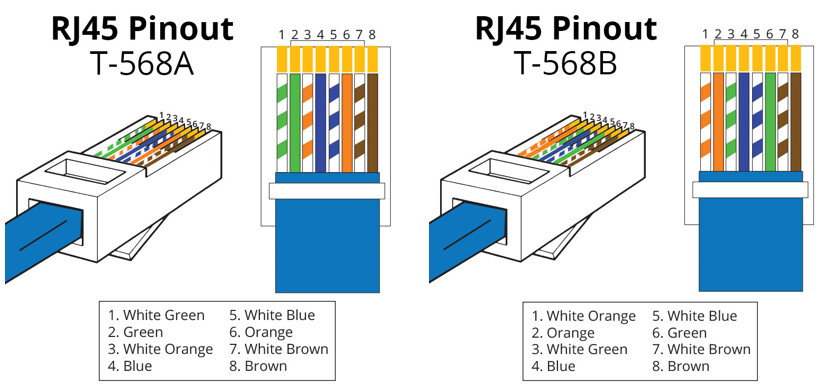
If you’re directly connecting devices, you likely don’t have an IP conflict, but rather an issue where you need a crossover cable.
Where most Ethernet Cables are called “passthrough cables”, a crossover cable, allows two hosts to talk to each other by allowing the Send and Receive lines to “cross over” the wire (Kinda like humans uses their mouth to talk, and the ears to listen).
This means, when one your Mac sends data, it goes to the receive lines of the Denon hardware, and vice versa.

You can forego any of this crossover cable stuff by getting an inexpensive 4 or 5 port ethernet switch.
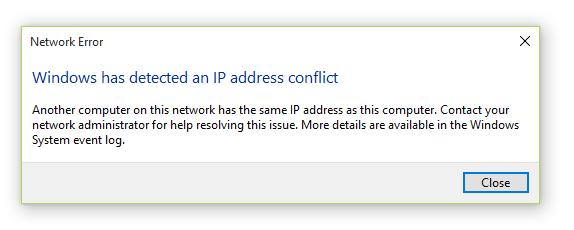
Also, IP conflicts are escalated to users on MacOS (sort of like this windows error)
Hope this helps.
Gig interfaces support auto-mdix which does not need a cross-over cable to directly connect 2 devices. The Yellow icon normally means the interface cannot reach the internet. Unless a DHCP server is running or the interfaces are manually configured a network interface with auto assign a 169.254 (APIPA) address.
I’ve not used Soundswitch, does that auto discover via broadcast or multicast network devices ?