Hello, I’ve been trying to use an SD card with Engibe DJ for weeks. Everything worked fine until February, but then Engine DJ stopped accepting the SD card. All new SD cards (32 and 64 GB) aren’t being read. Can someone help me?
Before, I managed everything perfectly with the SD card, and it worked fine.
My Sandisk SD cards (64GB and 128GB) work perfectly fine, in multiple Engine versions, and completely formatted now and then. Performed a 7h set on one yesterday, all fine (minus sluggish keyboard input lag and preview list presentation). Remember to use the Library Cleanup function, keep your cards dry and clean, keep 15-20% empty space as reserve. Also, more infos would be helpful, does Engine DJ or Engine Desktop not accept your cards anymore? Do they still get shown in the Finder and Disk Utility Manager?
Thanks for the answers. But I’ll try to describe my problem in more detail. I’ve already copied all the music folders to the SD card and stayed 20 percent below the SD card limit. So far it’s always worked. There are no problems on my hard drive or the USB sticks. It always becomes an issue when I want to convert the folders in Engine DJ. I can see “Jobs are running” at the bottom left, but it doesn’t read them into Engine DJ. I can see the folders in the Engine Library in the left column, but when I try to add them to Collection in the Drives column, the folders aren’t converted. I’ve tried several SD cards and different SD adapters, but it doesn’t work. Everything that works with a hard drive and a USB stick doesn’t work with an SD card.
As far as Engine operates, it writes to media the same way. If it’s an SSD, USB Thumb Drive, or SD Card – it’s nearly all the same system calls to write to the media.
Can you explain what you mean by “Convert the folders in Engine DJ”? Is this you dragging and dropping music onto Engine or are you using the Sync feature to export playlists to the SD cards?
All of this makes me question how you use Engine exactly. Are you manually copying music to your SD cards and then adding them to Engine?
I used new SD cards from ScanDisk (32 & 64 GB). I tried both options. I copied the folder directly (via drag & drop) from the hard drive into Collection (Drives), first to the SD card, and then (via drag & drop) into the Collection folder (Drives) (I said “converted”).
Everything that works with a USB stick doesn’t work with the SD card, and I was able to do it with the SD card before. I’ve had this problem for six weeks now and I can’t solve it.
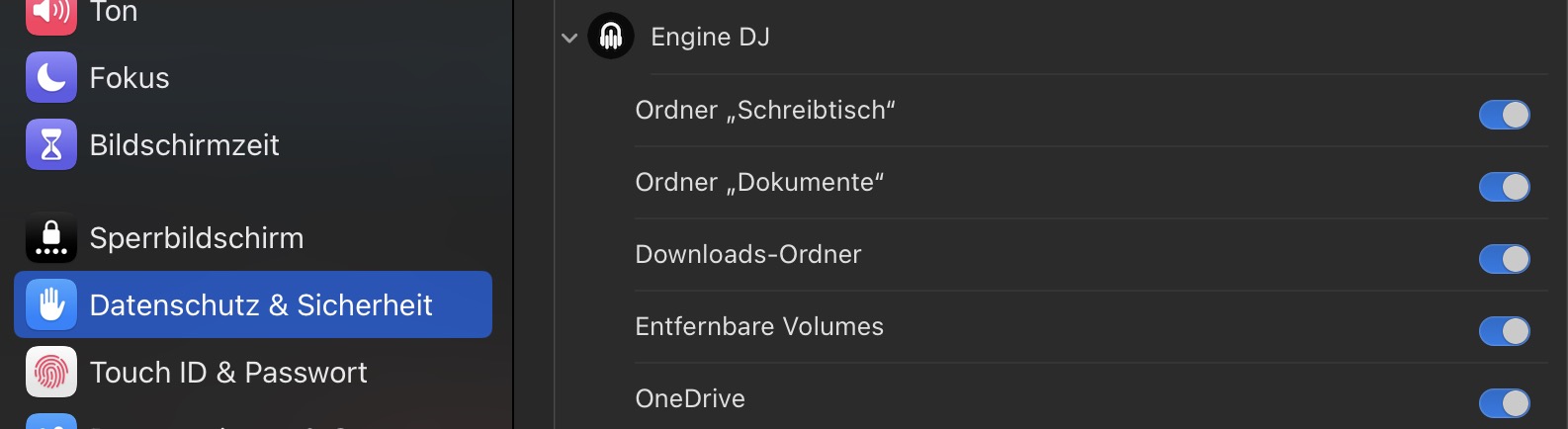
Now, as you say it… I had a quite strange, but similar issue - just the other way round: EngineDJ could read my SD cards, but nothing connected to my USB ports (thumbdrives or the P4 SSD didn’t appear). It turned out: A security setting in MacOS prevented EngineDJ from accessing external volumes.
“Removable volumes” wasn’t enabled.
Might be worth a check. Disable and re-enable it. Maybe you’re lucky.
I’m not sure if this helps with this exact issue and/or if it’s caused by this, but you can try to format SD card to FAT32 or ExFAT, but whats more important, to set partition to MBR (as Engine OS doesn’t accept partitions in GPT format) using a partition tool utility like Rufus
Reading the notes here there are a few things that concern me.
First let’s level set. A Engine Library is the combination of tracks and the database that provides extended metadata for Engine OS and Engine DJ to use.
In my reading of your responses it seems as if you have attempted two things, copying the files over directly and using Engine DJ.
What may complicate this further is if there is a Engine database on that removable drive, it is going to try to identify the deltas between what you have on your laptop and what it has on the removable drive.
Engine works best when we maintain the idea of a master catalog. A central computer where all of your files and your database resides.
Then all other removable storage devices and even the SSD in the EngineOS device are instances of the master database. So that once you make an instance of the database and perform using that instance the data collected while you perform changes and can be synchronized back to the master instance.
What it appears that you have done is you have created peers which in data science terms is called a split master because all instances have unique data that the other doesn’t have.
This isn’t an Engine issue this is a curation issue about how you store your music.
To fix this you have to employee good data curation techniques and collect all of your data to one central location and then build your instances from scratch.
When I am preparing sets, I use the Remote Library function and I only create an instance when I am going to perform so that all of my metadata is stored in once place and I don’t create a split master.
Sounds like a bunch of bull! Why can’t DennonDJ just fix this ■■■■! Tired of all the red all the time. If I go from my prime 4 to Numark Prime go or forget to process new added music it’s a red pain!!!