Note: All these issues occur on a brand new harddrive that contains a brand new Engine DJ database.
The issues:
The SC5000s continuously freeze (this occurs at some point every time I use them, see YouTube link below)
The SC5000’s state the new harddrive is corrupt, yet Engine DJ and my Denon Prime Go do not say it is corrupt
The SC5000s take 2-3 minutes to load my database upon powering them on. The slow loading database also occurs multiple times throughout the night when scrolling through playlists. The slow loading also occurs on my Denon Prime Go
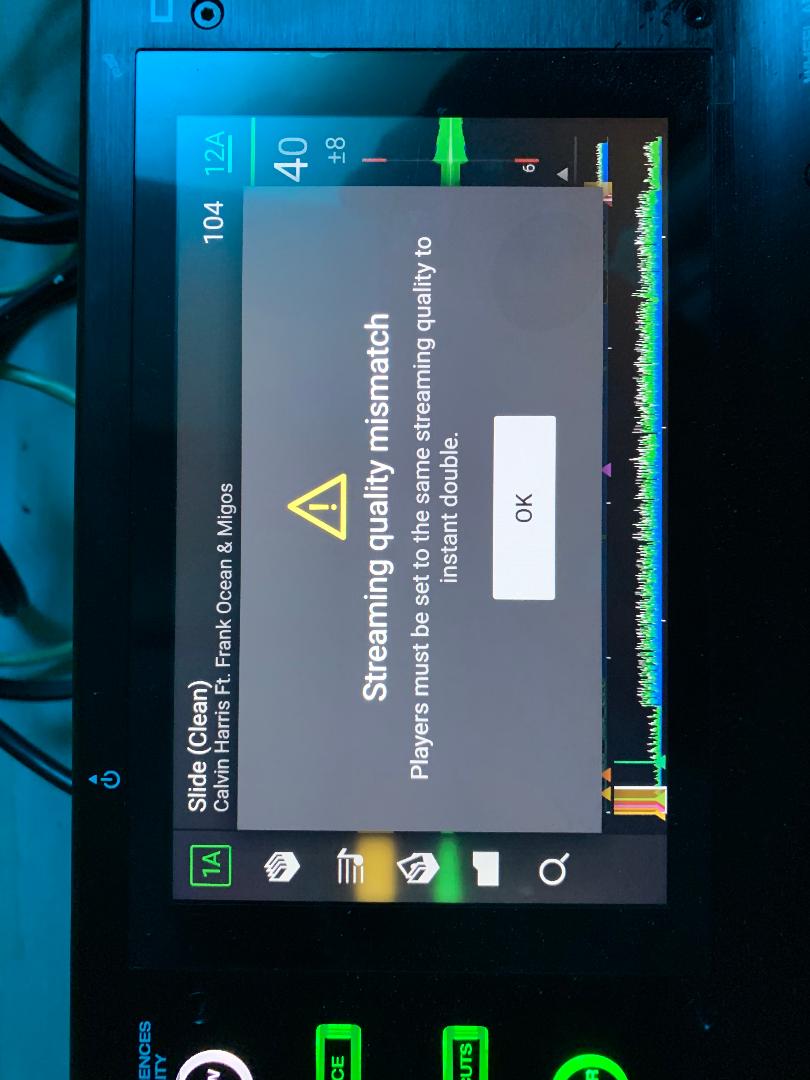
The Streaming quality mismatch glitch keeps occurring on my 5000’s but not my Prime Go. See image below.
2x SC5000 (latest firmware, all issues persisted over every firmware version)
x1850 mixer (latest firmware)
1 BRAND NEW SanDisk 500gb extreme SSD
All issues also occurs on my Samsung T5 and T7 500gb SSDs
All issues occur regardless of which desktop/external drive combo I manage my music with
This is the third external SSD that all issues are occurring on (the other two being Samsung T5 and T7 500 gb SSD’s). I have a completely fresh Engine DJ database on this new harddrive. I have also managed each harddrive across 3 separate computers to rule out the computers being the root issue.
This post is not to resolve anything, because Denon is aware of all these issues and there is nothing they can do to fix these inconsistent, proven issues of the SC5000’s/Engine DJ. Be wary of how unreliable these units are, especially if you DJ for a living and need something you can trust.
Feel free to look through my YouTube channel (from the link above), as I have a dozen other videos of all these issues. There’s too many to post on this thread.
The streaming quality issue you’re having, is that because your players aren’t matched up for what file quality they are streaming? I don’t use the services but I’ve noticed there are different levels of audio quality to download, is it saying instant doubles don’t work because it needs it to match?
I think Mufasa has a good point, wipe your entire collection from the desktop app, format your drive then rebuild from scratch… with Engine desktop and the hardware on the same version.
Bear in mind the system has been through 2 major database changes since inception… on both occasions I did a rebuild of my library.
You at least want to be deleting the db file from your PC and doing a full analyse of your tracks before exporting again.
Failing that, after 5yrs of posting problems on YouTube, sell them and move to the competitors products if your business relies on it.
In my opinion, that comment isn’t accurate, just verbal graffiti borne of frustration.
I’ve been using a pair of SC5000 on my main wedding set up since the month they launched and I’ve not had any unreliability issues and that’s on 60 to 80 gigs a year now that covid restrictions have dissolved.
I think you hit the nail on the head with the first comment Mufasa. He has constant corruption messages it points to some issue with the data he is presenting to the device, rather than the device itself.
I also noticed on one of his YouTube shorts he is using them outside in the rain, I’m fairly certain that will be doing them no good at all, and could potentially point towards any issues with tracks skipping or freezing momentarily (water on the capacitive touch platters)
One issue people have with new external drives is that the front usb port on sc5000 is only usb 2.0 - but the back ports are usb 3.0
Despite waffle on the drive manufacturers drive packaging is a tight load of guff about a usb 3.0 drive being fully backwards compatible with all usb 2.0 devices - that’s not usually correct… indeed can be impossible to offer as a 100% guide or promise. So make sure new 3.9 drives are plugged into the back ports on the SC5000
Ive only just noticed they are using ‘external’ SSDs (I keep forgetting the 5000s dont offer internal). I guess that could definitely contribute to the issue.