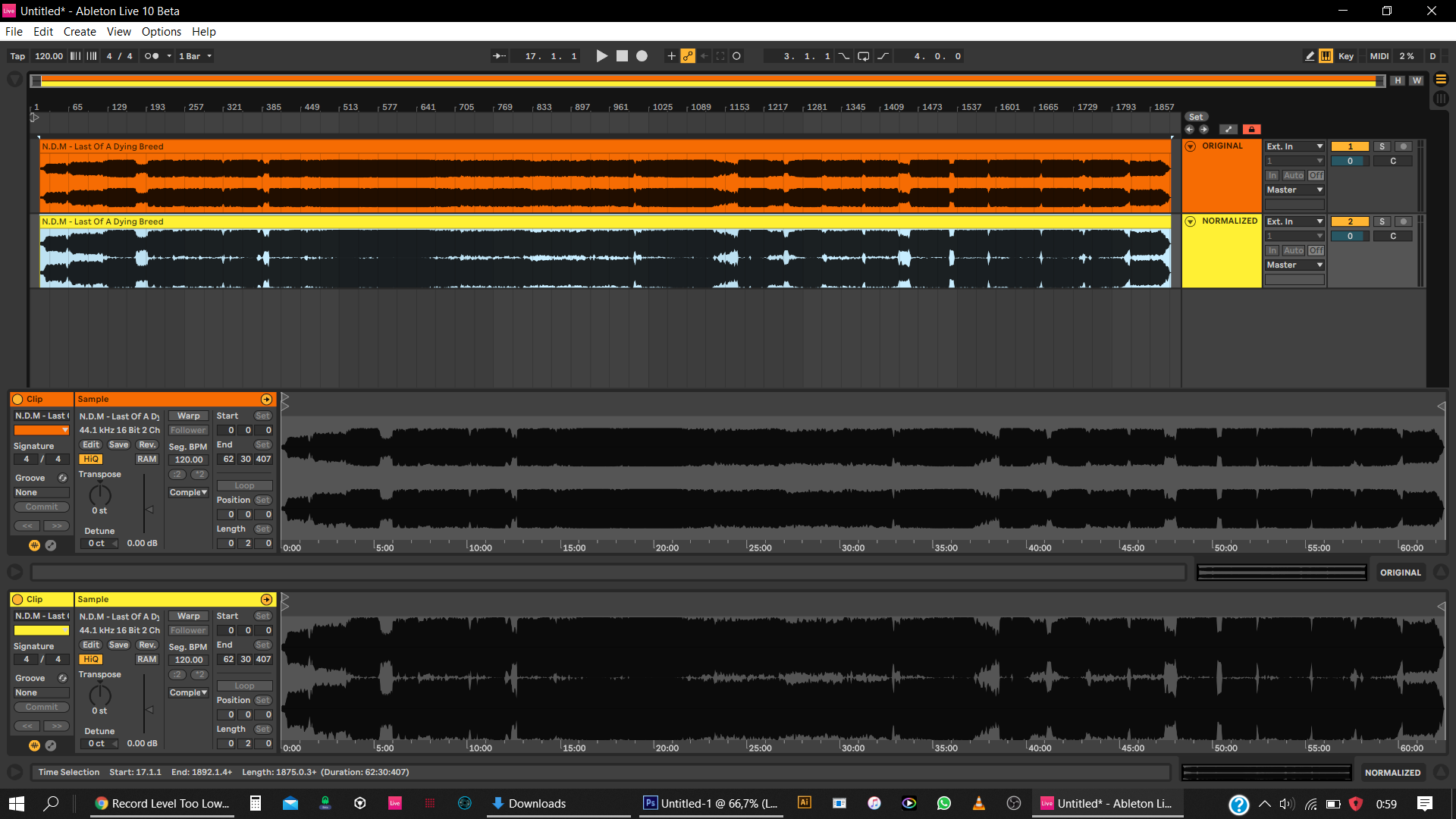
Normalized version is processed. and around aprox. 4db’s was needed to reach the set value of -0.5db.
(i used ableton here because… i have it and i use it constantly. same goes for audacity or other software btw…)
BTW I’m not ok with the hostility of your approach here.
Trying to state a mistake many dj’s make by giving you all the needed info in full depth and a solution to fix an issue here.
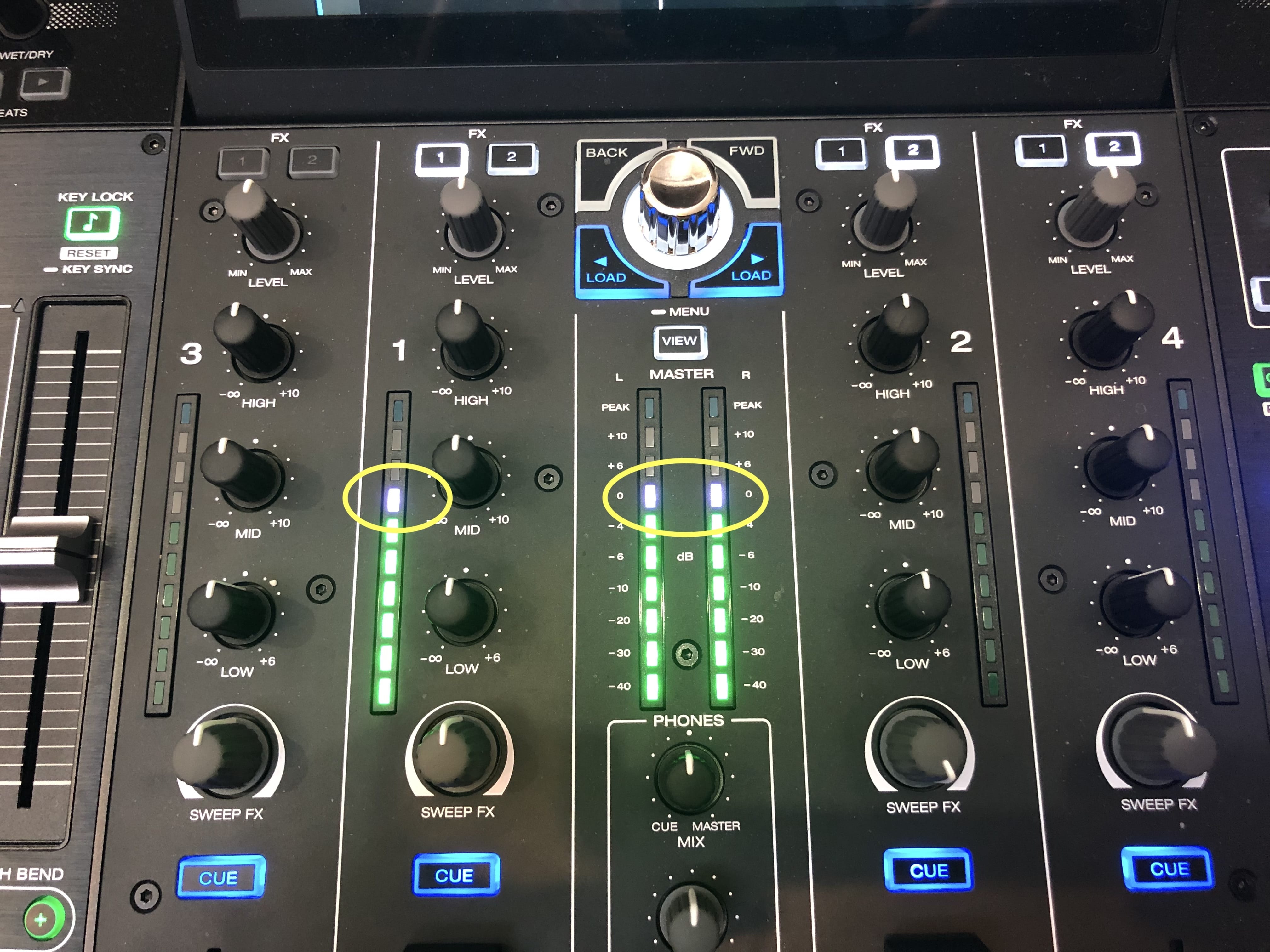
OH MY GOD YOU HAVE A RECORDING THAT NEEDED 4dB of boost!!! You actually didn’t establish at all how you recorded that and what you did to get the original. Did you follow the instructions in my last post or is this just some random mix you did on the P4 before? I’m highly doubting you did an entire mix with every knob on the channels cranked to max to see how loud it can get. The fact you needed to “normalize” something at all or bump it up 4dB to get it close to clip doesn’t mean anything to me or anyone else. Your recording is actually kind of hot and reckless for a normal digital recording of a mix. The fact I see any rises and falls at all in that recording and the fact it’s long tells me you didn’t follow those instructions. For all I know this is an hour long mix you did and you ran your meters much of the time into the second to top LEDs on the meters… up right before the top clip LEDs. FYI, the second to top LED encompassed usually about 10dB of headroom until clip, so staying out of the top LEDs is going to give you somewhere between 0 and about 10dB of room until clip… without exactly knowing how much until you actually hit that top LED and clip.
So that’s HOT. How frigg’n hot you want it? This is a digital domain recording, man, and you ran your meters how I just described to get that. Totally normal. Not normal technique, but normal digital levels functioning. If you can get within 5dB of full scale clip while staying out of the top LEDs then THERE IS NO ISSUE with the record levels. Hell, a DJM-800’s SPDIF actually clips at -5.5dB below full scale. The Denons all seem to let you go up to max.
I still waiting for that option they should add that feature … i spend money on this standalone dj unit and doesn’t have a record level yet on the software
I think the next person who starts a whole new topic to ask for recoding level to be added to the firmware should be asked to put. Euro in a jar aomewhere, like a swear jar. How many same topics have we got on this now?
I think a recording level option might get added, sometime after Corona is settled
Yes they should . But on one unanimous single topic . Not two dozen loose iineffective threads. Some people seem to be posting still, as though they think they are the first person discovering the level isn’t as high as they’d like
Many people already said it and it is in general shown before You can post anything anyway - USE THE SEARCH FUNCTION BEFORE POSTING - but no one seem to use it, and then we get duplicates of duplicates…
Could anybody let me know how to get my recordings (and even all other songs) transfered to my USB device to adjust the file with audiotrimmer?
Thanks !
Can anybody give me the tl;dr on this topic? I have the same issue but there’s so much bickering in this thread I’d rather not read the whole thing and try to make sense of it.
I normally keep my master at the 0 mark and all my channel levels at or around the 12 o’clock, with minor adjustments on a track-by-track basis. Generally speaking my entire mix is at the 0 db range on the meters.
On my monitors it sounds perfect. On my streaming OBS software it sounds perfect. But if I hit record on my Prime 4 it’s way too low.
Am I doing this all wrong? I would much rather record raw from Prime 4 than extract compressed audio from my OBS recoding.
Denon have said that they will be addressing recording levels in the future. It’s been hinted at that denon May put a sliding recording level control on the screen.
But, and this is why I’ve just sold my 2 x prime 5000 and prime 1800 and deleted engine prime from my computer, the time between denon saying they’re going to change something and that change getting through to the masses is years and years and years . What did it for me was that the loss of trust that I’ve suffered with denon. Denon repeatedly saying “coming soon” for 2 years and now “just around the corner” for the last 2 months and still nothing got to me. It was like lending money to a “mate” and him saying “I will pay you back soon” for 3 years… finally you find it more realistic to simply think “he’s never going to pay me back, might as well forget it”
These are my feelings, that’s why I sold my primes. It doesn’t mean the “coming soon” things that are “just around the corner” will never happen. It’s just that I’ve completely lost all my trust in denons timetable and their way of expressing any timescales
Denon said they’re aware people are complaining. I haven’t seen any evidence there’s actually a problem, though… quite the contrary, actually. So far all I’ve seen evidence for is poor habits and poor understanding of digital audio & recording.
Is it metering further away from the top meter light in OBS than it is on the Prime 4 or in any other software? What kind of computer are you using?
The audio that should only go up to 0dBVU (-18dBFS) on a DJ mixer audio VU meter is very dynamically-compressed music, a sin wav, or pink or white noise. Ordinary crest factor music should peak beyond the meters’ nominal point. Just keep it out of the top meter LEDs, and optimally you should leave the second to top meter LEDs as safety headroom you also do not intentionally exploit. Audio with differing dynamics needs different peak levels to be at the same ‘loudness’ or average perceived volume from track to track.
It’s not at all strange to have raw digital recordings with peaks that are quieter than commercial releases when you open them up in a DAW or sound editor.
I’m really sorry, but I’m having a difficult time understanding what you’re trying to tell me.
Let’s forget about Streamlabs for a moment since it’s not the most important thing here. You said the evidence is “quite the contrary” that there is anything wrong with Denon’s internal recording, so let me explain what I understand to the best of my knowledge, and I would appreciate if you or anyone else could correct me.
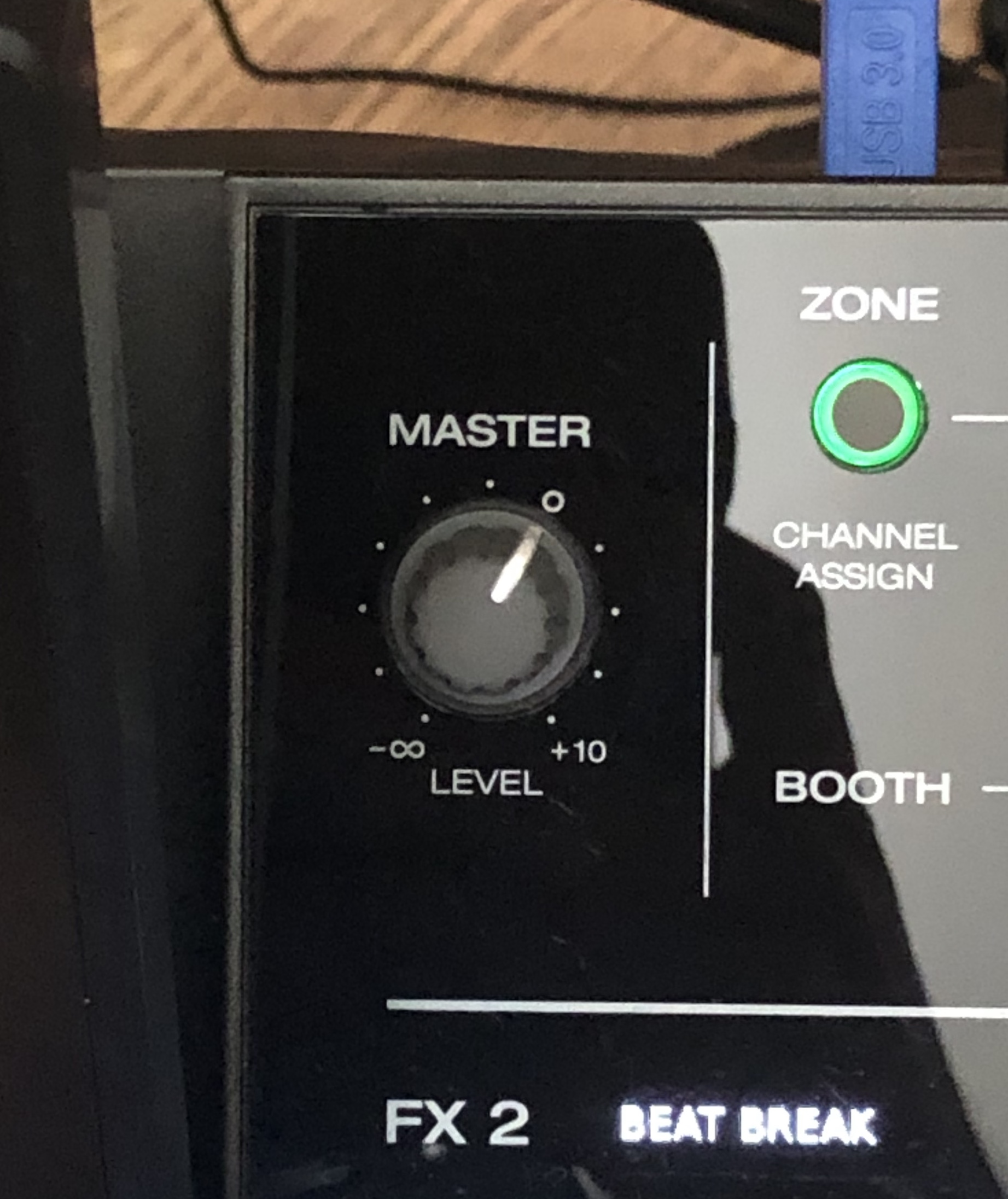
I understand that the channel levels and the master level have specific 0db points (physically marked with zeros on the controller). So in this example, this is how I have them set:
Right now, aside from individual adjustments to individual tracks, all my sets sound great just about here.
It’s possible that I am totally mistaken, but I am under the assumption that if I load a track straight from Beatport, hit record, and play it and these exact levels in my photo, that the resulting recording should approximate the original recording? Well here are the results:
The recording is so quiet that even adding 10db in Audacity afterwards does not get it close. Not only that, but I feel it loses quality. Doesn’t sound as punchy or clear.
Now I understand I can just turn all the channel levels up as a workaround, but how is that a fix? What about the rest of my gear that won’t be able to handle it? What about when I travel or use someone else’s external hardware? How could my recordings possibly be more than 10db quieter than the original tracks?
Please tell me what I’m getting wrong here. I would be infinitely thankful.
It’s not you! Everyone Brought this issue up including myself to denon. Yes the recording is low no matter how high u adjust the levels. It’s should be on there list to fix up. Hope soon you not alone on this one
Let me try to explain without the university level text from a forum colleague. Sorry Reti!
The volume of track can go up to 0 dBFS. Higher than that digital level is not possible.
If you would mix two of those together, clipping will occur, because the sum of those could theoretically reach +3 to +6 dBFS; which is again not possible.
What you see on a mixer as the zero is 0 dBu. That mixer zero translates to about -18 dBFS, leaving you the headroom to mix more tracks together without clipping or reaching, in essence, +18 dBu.
So if you test a near 0 dBFS track, it should record at about -18 dBu.
Loudness is not just peaks, but relates to average level usually measured in RMS (root mean square) or more commonly now LUFS (loudness units in full scale).
The levels inside the mixer will not be exactly the same as the original file. Inputs are ‘padded’ to bring their levels down so you have headroom. Commercial tracks often have little to no headroom. You must remember you are operating within a digital signal processing medium with a maximum hard brick wall limit of 0dBFS.
The VU meter zeros are the NOMINAL recommended peak level for the mixer only with continuous or near-continuous signals. This is actually to provide sufficient headroom for, in contrast, very dynamic audio that will instead need comparatively higher metering levels to reach the same perceived loudness as the near-continuous stuff while still having reasonable available headroom to prevent all clipping. Audio with a high average level will have its peaks and average closer together and therefore the nominal VU metering point for something like a sin wav or pink noise or Sonic Youth is going to basically be at or close to where its peaks show on the meter. In other words, you don’t get any bounce on a responsive VU meter with a sin wav, and there’s no confusion that its average and peak is the same thing and ought to be metered at about 0dBVU if you’re trying to get loudness about the same from track to track. A dynamic track is going to bounce below and above its average point, and should therefore have troughs below nominal and peaks above it when the music is in full swing.
The zero on the master out volume control is the UNITY – that is the point where the output for that particular stage is the same as the input level of that stage. So if you put the master knob at its unity, the level from the master stage will be the same as the level going into the master volume control. You should definitely have the master volume control at unity.
Nominal and unity are not the same thing. The meter zero is not unity. The zero on the master volume control is not nominal.
There’s nothing wrong with that Raw Denon Recording’s level and is what you’d expect from recording the record out or exact in situ internal recording with the gain structure you described on properly-designed digital gear prior to mastering it in a DAW or sound editor. Completely normal.
DJ as I described and in a DAW or sound editor in the future you can bump everything up by an even 6dB later. I advise you to not raise the volume in post by such that the final version is higher than -3dBFS.
This is the result of the unwise use of various degrading digital processing techniques in Prime right now. I have a list of them I’ve compiled that I won’t go into here at this time.
 seriously how hard could this even be to address?