Does it have a way when I trigger the continuous play that it won’t have any blank or no sound between the song?
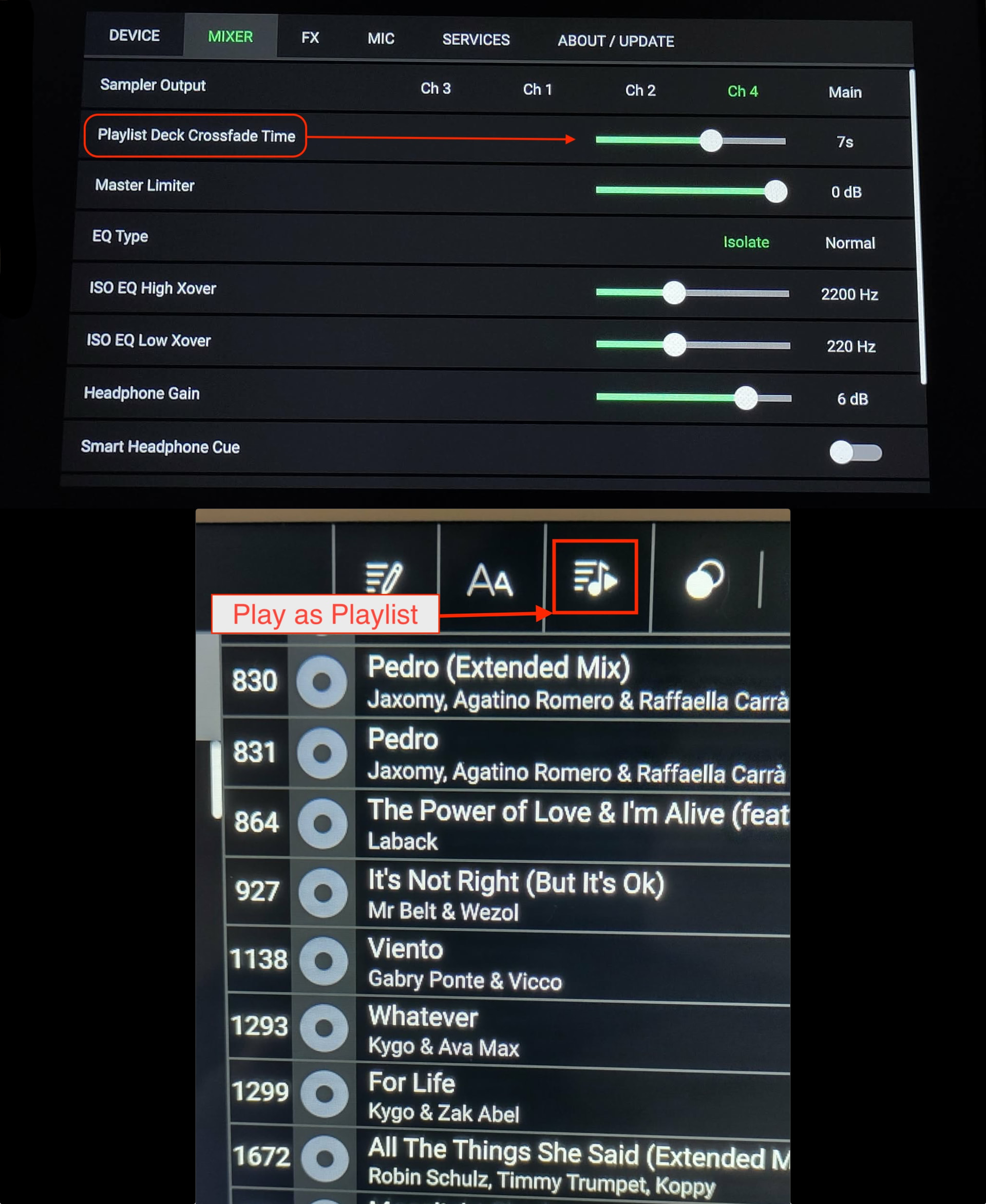
No, it does not. There is another way to mix together by loading a playlist in a deck which will blend together.
I already explained the trick to him on a Denon Facebook page.
“Mathieu Bélanger: Yes, it’s possible! But you have to use the “Play As Playlist” mode. First, you’ll need to go to your player’s “Settings,” then the “MIXER” tab, and go to the “Playlist Deck Crossfade Time” line. On the right, choose the transition duration, which ranges from 0 (OFF) to 12 seconds (see screenshot). Then, go back to your “Playlists” and select the folder you want to play continuously. Click on the icon with lines and a musical note (see screenshot). This will remove the gaps between tracks, which will then play automatically. This continuous playback mode will be enabled and functional on Deck 4 of the P4/P4+. On the Prime GO/GO+, it will be Deck 1 or 2. I don’t own the SC Live 2 and 4, but I think the functionality will be the same as on the P4/+ and PGO/+.”