Prime 4+ – Audio stutter and lag when loading tracks (Engine OS 5.0.0)

I have now spent my third weekend working on an XDJ-AZ because of the current Prime 4+ situation.

To be fair: the AZ has been stable throughout the gigs. No crashes, no audio dropouts, no real operational concerns.

However, the experience also reminded me very quickly why I personally still prefer the Prime platform overall.

From my perspective, the AZ feels significantly more limited in standalone operation:

  • no standalone stems support at all,
  • comparatively sluggish browsing with larger libraries,
  • and generally a much more conservative workflow philosophy.

Even with my relatively moderate library size (~9.8k tracks), browsing sometimes felt surprisingly sluggish to me — in some situations even less responsive than Engine OS 4.3.4 on my Prime 4+.

That said, stability-wise the AZ did exactly what it was supposed to do: it simply kept running reliably throughout the night.

In the end, this probably highlights the core difference between the platforms: The Prime ecosystem currently feels far more innovative and ambitious technically, whereas the AZ feels more conservative, but at the moment also more confidence-inspiring for pure live reliability.

Well I call both largest AIOs of both brands flagships.

RX3 is a better plan than FLX4.

Edit: and you deleted the comment a replied to.

Serious question. Do you use a 3rd party APP or software to manage your Denon library between the AZ or Rekordbox?

I’m a specialist on a Facebook page dedicated to Denon players in France, “Denon DJ Prime 4, 4+, 2 and Go Fr.” It currently has 2500 members, and so far, only one person has experienced a bug involving brief audio dropouts when loading music into the Decks (the problem has since been resolved).

Others have reported a bug since the change in how music is loaded into the Decks (swiping right used to load the right Deck, swiping left loaded the left one instead of sending the file to “Prepare”; now, to send a track to Prepare, you have to swipe slightly to the left, and once halfway through, a “Prepare” touch button appears to place the file).

Regarding the jitter… the only known issue, which has been present for several years, is the waveform display issue, but this doesn’t affect the audio. The jitter is related because the waveform is displayed in real time, whereas before, in versions prior to 1.6.2 or earlier, the waveforms were cached.

There are certainly cases with audio stuttering issues, but strangely, they don’t appear very often on the official forum (they’re not going to find a real solution on social media).

Regarding the problem, we don’t have enough details about the usage conditions (streaming platform, therefore Wi-Fi and Bluetooth were active; use with Engine Light; audio files with images having higher resolutions than recommended; type of audio format used; number of audio files; storage device used; format of the storage device; storage capacity; was the update performed via Wi-Fi, an .img file for updating via storage device, or with the installation utility…?).

"Personally, I mainly use the .img file or occasionally the installation utility.

I chose this method because in the past I had problems performing updates via Wi-Fi, and I no longer do them that way." I never experienced any audio crashes or stuttering issues, whether with my P4 from July 2019 to October 2023, or later when I bought the P4+ (I bought it to use as a backup for the P4 since it was getting old and had accumulated a lot of use). In February 2020, I bought a Prime Go, which never let me down. In May 2025, I sold the P4 because it was never used as a backup; it seemed a shame to store it, so it would have been better for someone else to use it.

I use my P4+ without any problems.

In early February, I bought the Rane System One (being an old-school DJ, I love the feel of vinyl, and have since 1991 with the legendary Technics SL1200/1210 and MK5 turntables. I was a Pioneer devotee from the release of the CDJ500 Limited to the CDJ2000 Nexus (I’ve owned a lot of them).).

I have over 10 years of experience as a reseller of DJ, lighting, and sound equipment in France for a well-known retailer.

Cava ou quoi DjMell26,

bigUps for your participation and I really hope the follow up isnt taking wrong (no offense or however)

Then you’re one of the lucky one’s currently. But I really like to point out, the matter’s explicitly on Prime4+. (2-channel mixer seems not to be affected at all).

Nor is it my intention to harm Denon reputation in any way!!! I still want to extend with a 2nd LC6000!!! (Error also appears with no LC6000 connected)

Now the “BUT”, as the device works for several use cases e.g. Wedding-Gig. I aint visiting weddings often, but to my experience… loads of pop/rock songs will be played and the experience is almost like a radio show…

I personally play liquid,jumpup,dancefloor music. Most of the time, I’m running a mix of 2tunes+. (even no ZONE)

So to cause/trigger the problem, the device needs just to be on a stressed level. Which leads to the question:

“Have you tested the device, like i described in the thread before” ?

I will summarize the test one more time and provide further information of my system.

Step 1 preparation:

Take 2 Tracks, double drop them synced on Channel 1+2. Listen to the whole mix to assure your files have no whatever artifacts…

Step 2 the test:

Reset the tracks to the drop, assure you only hear your output sound.

Just use repeatingly the “Next” button on a third deck like a ancient discman.

If you ain’t facing any problems 'till the mix run out, I want your device :slight_smile:

==================

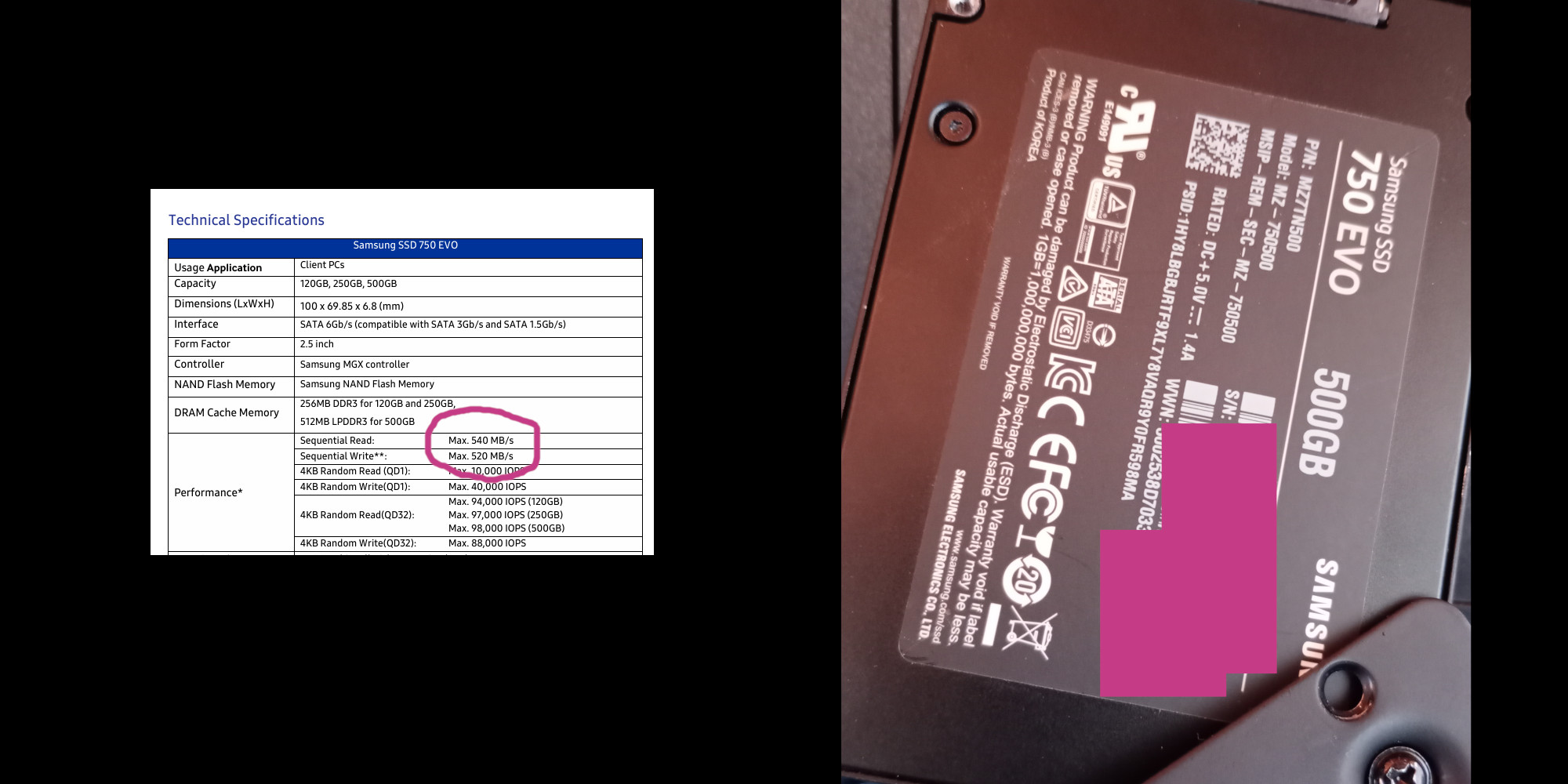
Maybe only a certain charge is affected, samsung ssd or whatever. maybe only edgecases i really don’t know what’s the matter. I’m just waitin for something to happen, i just wanna go back online for streamin n enjoying music with other people :slight_smile:

==================

Specs (I thought which could be important):

P.S: I was workin as dev 20yrs+, a not replicatable bug is hard to fix… The procedure i described takes 10 min to replicate :wink:

(fixed two wrong words in the edit)

I can only agree with this. It takes less than two minutes to reproduce the issue clearly and audibly.

Apart from updating the unit itself — including the database upgrade and a complete re-analysis — nothing about my setup or workflow has changed.

Under those circumstances, I would reasonably expect the system to continue functioning reliably.

Use Lexicon, it’s a free app to sync and immigrate library between dj software

Lexicon, and then into RB. Then just load the tracks onto your storage device using RB.

Since I use FLAC, there are absolutely—100%—no issues with CUE or Loop points.

It’s a bit cumbersome, but for me, it’s the cleanest method.

Sorry for the late reply. I somehow forgot about it.

I’m pretty sure 90% of the issues is library based. Run the same collection without it touching Lexicon and see if you have the same issues. IMHO the writing/rewriting of database is causing slowdowns in the Denon. There’s other methods for managing your Engine collection to Rekordbox without a 3rd party mucking with your database I do it al the time with zero issues.

As already described further above, I completely backed up and then removed my existing library for testing purposes.

After that, I created a fresh test setup consisting of roughly 50 audio files and a single playlist — no STEMS, no unusual metadata, nothing special at all.

I then analyzed and exported this small test library to:

  • the internal SSD,
  • a USB 3.0 stick,
  • and an NVMe-to-USB external drive.

Even with this minimal setup, the audio dropouts reappeared again after only a few tracks.

Lexicon itself does not modify the Engine database in my case; it only reads it. However, since the issue still occurred even after completely rebuilding the library from scratch, I no longer believe this is related to Lexicon at all.

I am absolutely open to trying alternative workflows if there is another practical method of keeping my rekordbox collection and cue data synchronized.

As far as I know, however, rekordbox only exports/imports via its XML structure, while Engine DJ can read RB XML but cannot export back to it. VirtualDJ is unfortunately not a practical solution for this particular workflow either, since it only allows exporting individual playlists to media devices.

Additionally, I also tested a completely separate USB stick containing another ~50 FLAC tracks copied directly onto the drive. The Prime 4+ analyzed the files normally and generated waveforms as expected — but after several successfully loaded tracks, the audio dropouts eventually occurred there as well.

For those experiencing audio dropout issues, could you try temporarily disabling anonymous data transmission to test and see if that improves things for you?

The device currently has no connection to the network. Nevertheless, I checked and realized that I had likely already switched it off earlier to see if that would have any effect. Aside from that, it is in its factory state. I have to admit that I am slowly losing interest in this device.

Hi, I have the same audio problem (I use Prime4+). I discovered something important to consider: if I use tracks analyzed by stems, they produce the drop, but if I use the same tracks without stems, the audio drops don’t occur. Note that this happens with FLAC, MP3, or ALAC… I use an internal SSD and an external SSD connected via USB 3.0 (SX2000), and the result is the same on both drives.

I loved the new update, but if it is not working well, we will have to go back to .a 4.6

So it’s probably a multitrack playback issue because when you play a track rendered as stems on a single deck, it’s already as if you’re playing four tracks simultaneously (which you can mute/unmute). Therefore, if you play four tracks rendered as stems on four decks at the same time, it’s as if you’re playing 16 tracks simultaneously.

There’s definitely a CPU/RAM resource management issue in the scenario where you’re playing tracks rendered as stems.

Heija @Gaian n @Gato_perillas,

I also tried to enable/disable several feature… unplugged from pc as long no need for the connection.

Since @U-w-B has tested everything on factory reset with “virgin”-lib and no stems, the problem can still be 'caused… itz not related to stems exclusive.

I reached the point where i can say:

If u notice ur device is one of one with the described symptoms, no fiddling will change that.

From my point of view everyone’s facing this issue is having 2 options:

  1. Go back to previous OS version (mine was 4.3.4)
  2. Be patient for an update.

Since @Reese already told us that the engineer havin an eye on it, i place my bet on option 2.

I’ve tested only with tracks that do not have stems, and I have the issue.

I have reverted back to 4.3.4 since

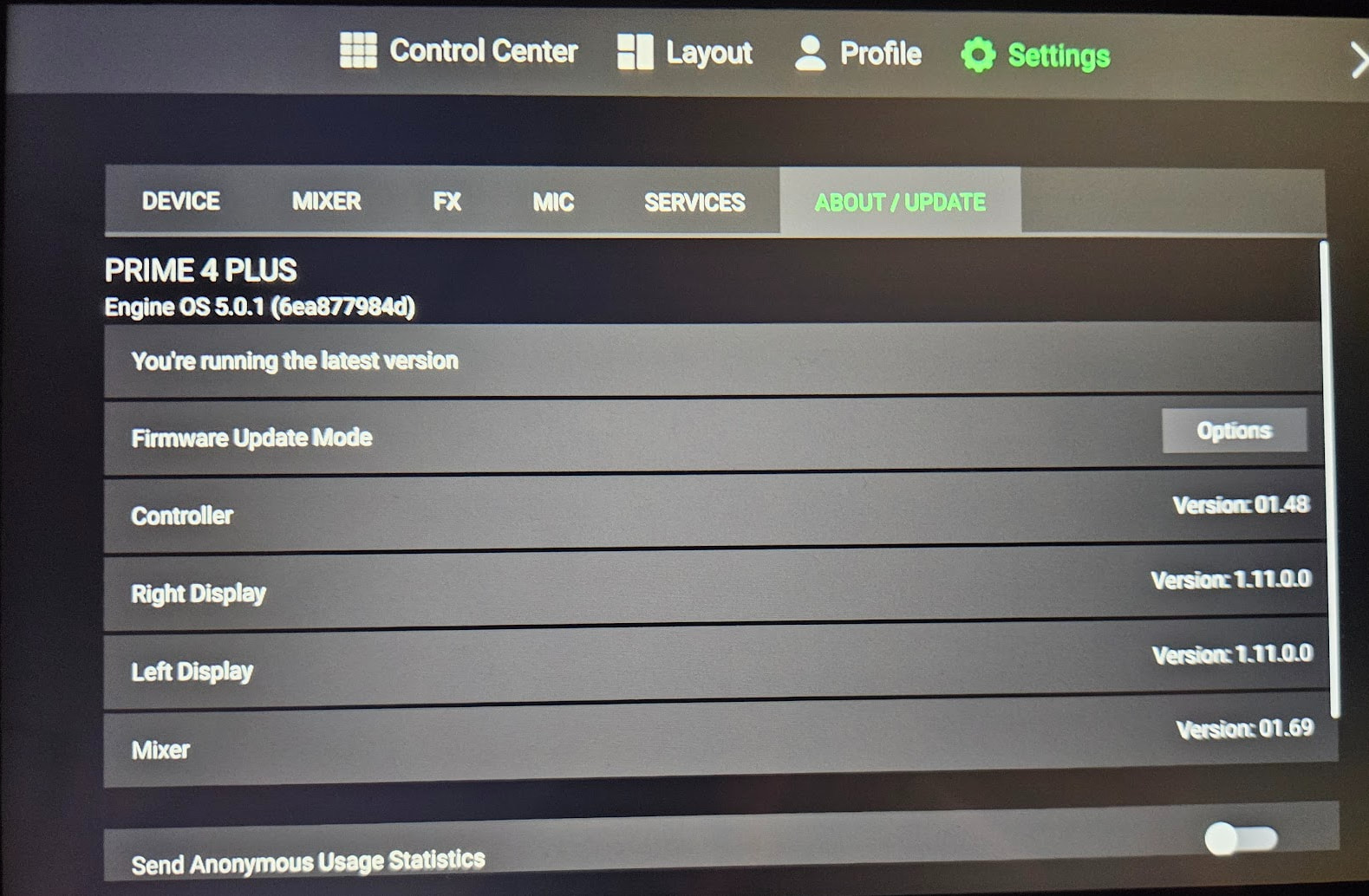
Same issue here (Prime 4+, 5.0.1). Sometimes happens when loading tracks, always happens when doing the following:

  • Instant doubles deck 1/2 → 3/4
  • Stop deck 3/4
  • Set cue point on deck 3/4 (syncs to the same song on deck 1/2)
  • Observe audio dropout (audible on headphones, master output & recording)

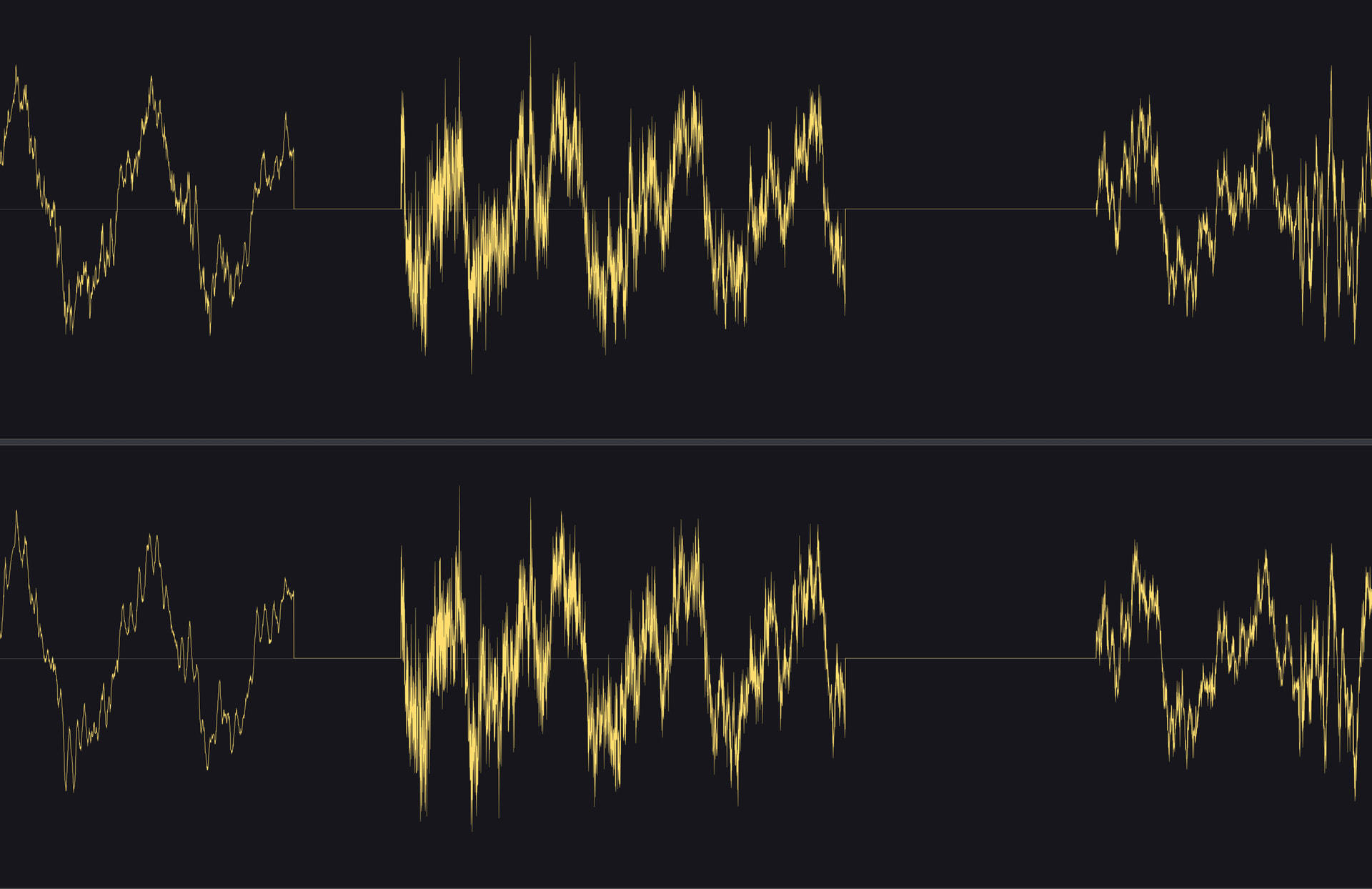
Dropout waveform:

On the debug overlay the xrun flag was true (in bold red letters), and the xrun counter increased by 1-2 every time a dropout was audible.

Will likely downgrade to 4.2.0 (I don’t trust later 4.x versions due to the waveform alignment visual glitch), which ■■■■■ because everything else feels so much smoother on 5.0.1 and I’d love to stay on the version.

Hope this gets resolved soon!

Hi all - Just another DJ reporting the same issue with 5.0 and 5.0.1. I am 12 days away from a huge gig and need a fix for this. No time to deal with another controller. UGH. Lets get a fix folks! #enginedj

Support has now responded to my case; according to their reply, the issue appears to have been identified internally and is currently being addressed as part of an upcoming hotfix.

Unfortunately, the suggested workaround was not particularly practical in my case—though it is entirely possible that I partially misunderstood it due to specific phrasing or nuances in the translation.

At this point in time, I personally would not use the Prime 4 for live performances in standalone mode running Engine OS 5.0.1. Usage in conjunction with Serato or VirtualDJ should, naturally, remain unaffected by this.

Standalone users have now also been advised to downgrade to version 4.3.4, as this is currently considered the safer workaround—though this naturally implies that some older, previously known issues will resurface. Personally, I do not find these older bugs particularly problematic; nevertheless, everyone must, of course, decide for themselves which compromises are acceptable for their own workflow.

Furthermore, there appears to be a potential incompatibility between the newer database structure of version 5.0.1 and Engine OS 4.3.4. As far as I can currently tell, this primarily affects the display of cover images (artwork) on the Prime 4; however, I may still be missing some details regarding this.

No specific timeframe was provided for the release of the hotfix.

Aside from the actual audio issue, I felt that both the general responsiveness of the database and the performance when browsing tracks were noticeably improved in version 5.x; I would very much like to retain these optimizations in the long term.

My personal hunch—and this is pure speculation on my part—is that some of these performance gains could be attributed to changes in the internal processing of cover images within the database structure. While I possess knowledge of electronics and some foundational skills in C# and Python, SQL and the internal workings of databases do not fall within my area of ​​interest. In short, I am an SQL noob. :grin:

Nevertheless, the fact that my database’s storage footprint shrank from approximately 1.2 GB to around 45 MB following a rebuild strongly suggests that this issue is indeed closely related to that.

Got a response from support to:

We are aware of an issue with Engine OS 5.0.x where playback stutters or drops out. The track will play correctly if you stop and press play again, or wait a few extra seconds between load completion and pressing play. We are working on a fix.

Not sure what they mean by this though, the dropout happens right after loading a track, but whatever. Seems there might be an update in-sight for this anyway.

Hopefully we will have an update soon to improve the performance, though I don’t have an ETA at this time. I recommend ensuring that you have your email preferences updated in your inMusic account/Engine Profile so that you’ll be notified when the next update releases. You should also get an alert on your hardware when the update is available over WiFi.