Greetings, when I export the playlists played in csv with Engine, the bpm information on the tracks is lost: could it be a bug? Into the file generated there are all the informations and the tracks played in the correct order but the BPM field Is set tò 0
Sounds like a bug if the field is there and the value is consistently zero
After opening a ticket and testing and counter-testing with all the other software, which correctly exported the BPM of the playlists created with my files, the problem was escalated to the developers.
Having the same issue. I hope it get’s resolved. I am doing my own testing to see if i get a solution. but for the meantime im getting 0 in the Bpm field.
Moin @georgedjmatrix ,
same issue here, furthermore lost keys.
Quick question: Do you get Zero (0) or blank?
Thanks for your attention and brgds BeatMaster
PS: I detected this bump, when the dataentering is created with information from a third party program, where you can enter BPM, Key and other information
Hello there Thanks for Stopping by and dropping your issue. Hopefully it gets resolved. With some improvements as to Selecting what Fields one wants to export. But that might be asking too much from our Denon Staff. well to the issue at hand and to answer your question hope it helps.
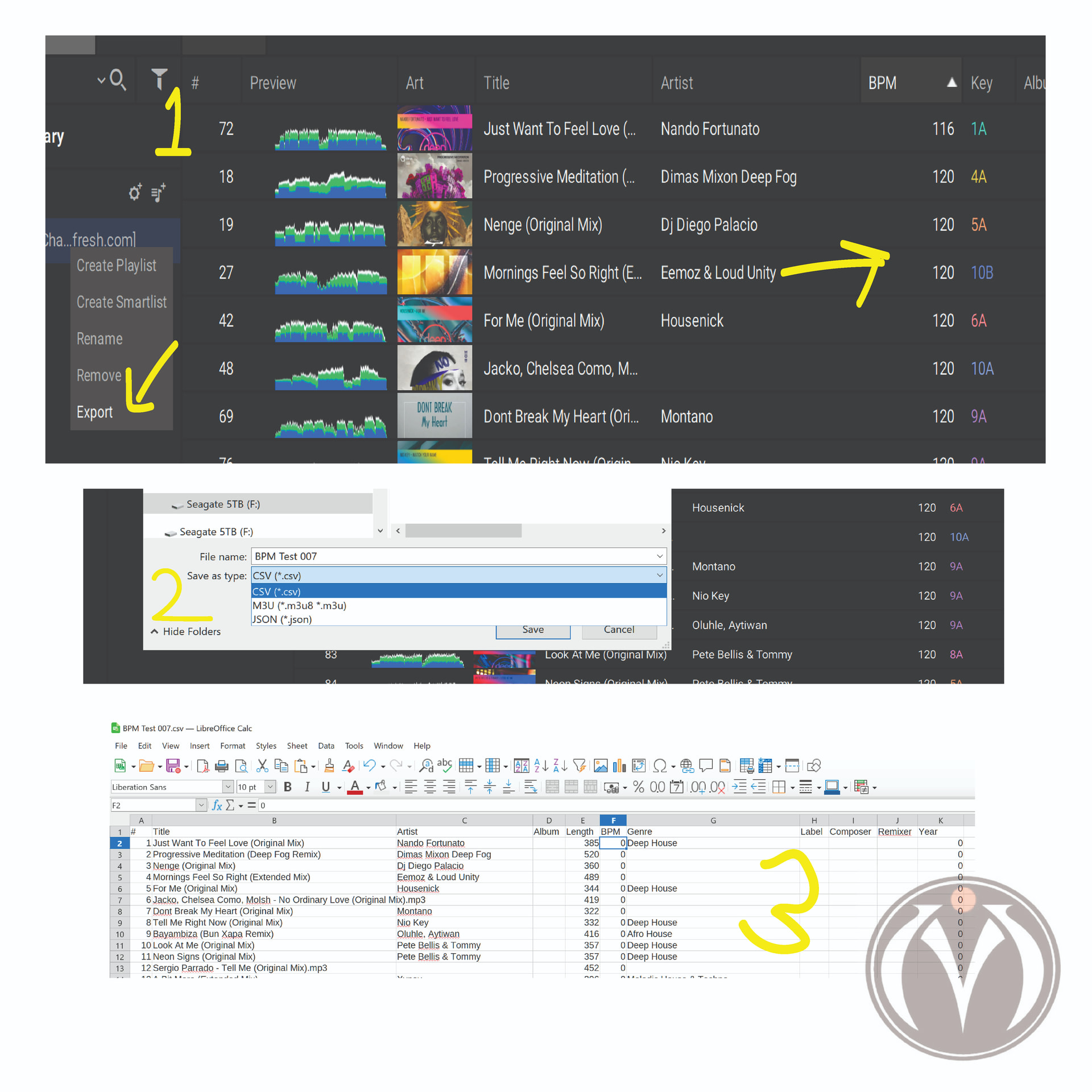
on one application i get a “0” and on other i get “blank”
0 if i use a spreadsheet application to view the files. (libre office)
blank if i use a tagging application to TAG my files. (mp3tag) and as you noted there are other fields that also don;t show up. like key,year,
i took some snaps of what i get i hope it helps into finding a way to get it to work. once again Thanks.
Moin @georgedjmatrix ,
thanks for your explanations. In my opinion it is really strange, to get different result depending on what software do you use.
As the export is not complete, it is really difficult to use the given information in other coherence.
Thanks again good luck for your puposes and enjoy the day.
Brgds BeatMaster
INCREDIBLE: Version 5.0 has been released and the problem hasn’t been fixed! I’m amazed.
It wasn’t prioritized. ¯\_(ツ)_/¯