EngineDJ Memo Bridge - Tooling for exporting from EngineDJ to legacy players

Tooling for exporting from EngineDJ to legacy players.

With EngineDJ Memo Bridge, selected legacy Denon DJ players can now be managed from a modern Engine DJ workflow. BPM, waveform data, cue points, hot cues and loop information can be written directly to compatible ID3 memo structures, allowing older hardware to rejoin the Engine DJ preparation ecosystem.

PRIME Gen-2

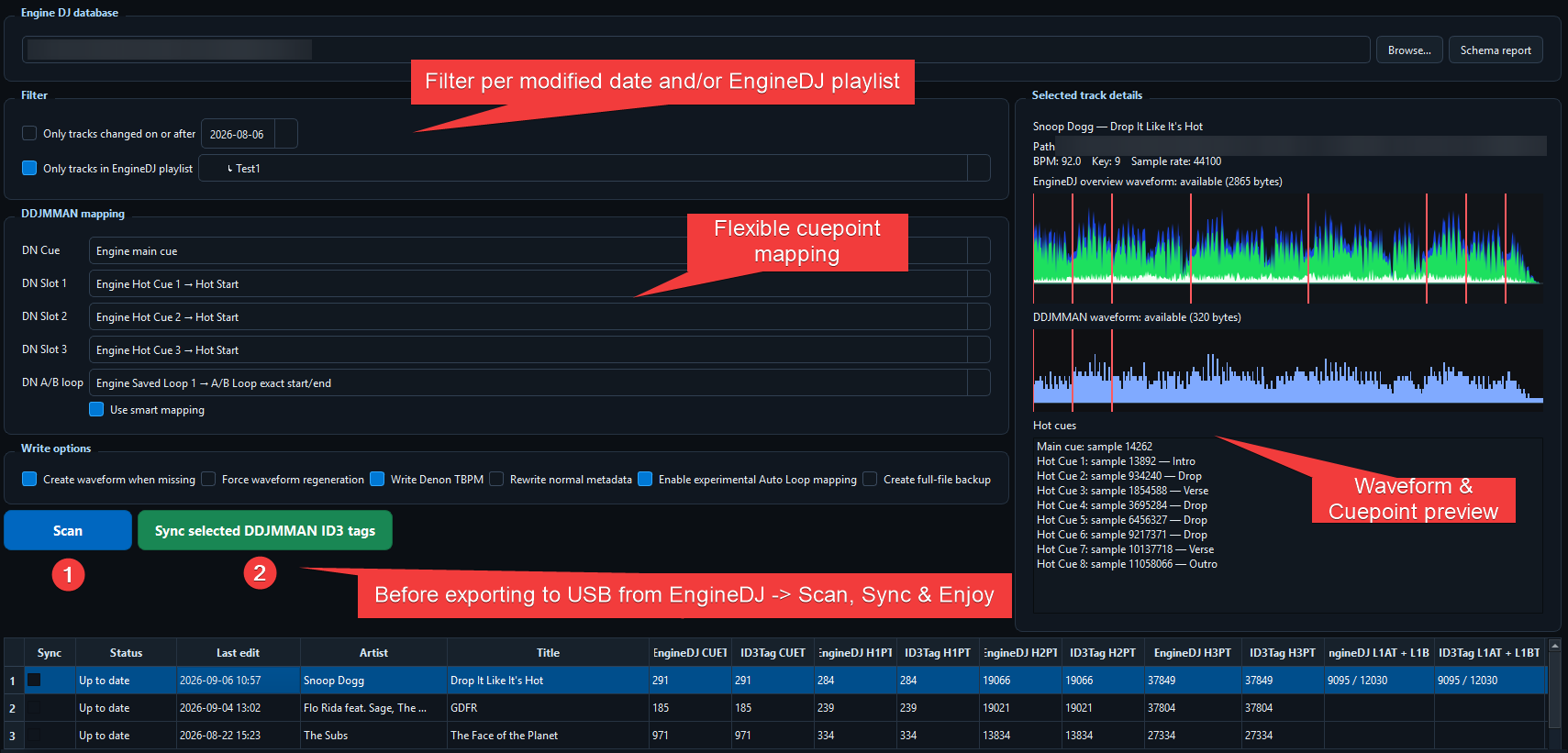
EngineDJ Memo Bridge is a desktop GUI tool that bridges modern Engine DJ preparation with legacy Denon DJ / DDJMMAN-style memo workflows. It reads the Engine DJ database read-only, previews the ID3 changes it plans to make, and writes selected memo information back into the original MP3 files before export to USB.

That makes a few interesting things possible:

  • prepare tracks, cues and loops in Engine DJ
  • sync supported memo data back to source MP3s
  • carry BPM, waveform data, cue points, hot cues and loop information into legacy-compatible files
  • keep the Engine DJ database untouched
  • export the already-tagged files to USB afterwards
Usage

At the moment, the tool supports:

  • Engine DJ m.db read-only scanning
  • remembered database location
  • filtering by Engine DJ modification date
  • optional playlist filtering
  • mapping Engine DJ main cue, Hot Cues 1–8 and Saved Loops 1–8 to legacy Denon memo targets
  • scan-first preview before writing
  • atomic MP3 writes with verification
  • optional backups
  • DDM/WAVE waveform generation when missing

Download

EngineDJ Memo Bridge

Latest release: v0.2.0

Windows x64 ZIP: Download latest build

Repository: wtrz/enginedj-memo-bridge

Original intro: Denon DJ introduces the PRIME Gen-2 media players: a focused addition to the PRIME lineup for DJs who want tactile control, physical media support and a more modular performance workflow.

The Gen-2 platform extends the Engine DJ ecosystem with a performance-first media player architecture: precision transport control, professional connectivity, onboard effects, dedicated performance points and flexible source handling from day one.

At launch, PRIME Gen-2 players offer USB, Compact Disc and Computer mode, giving users full OmniSource support. The platform introduces metallic design and proven LED technology to professional DJ equipment, along with a motorized 9-inch platter, RJ45 connectivity and three hot cue buttons thoughtfully placed above the platter.

The “Gen-2” name is pronounced Gen minus Two.

Wait, they’re bringing back 17 year old CD players? :rofl:

If they is Denon, probably no :slight_smile:

The repo’s owner name seems to be “wtrz”, I leave the other ppl to lookup his name on github by their own.

But that idea is pretty cool. :grinning_face:

Thanks. The thought started as a parody due to the metallic layer on the Prime 4 Gen2, but while dusting off my DN-S3700’s - I actually ended up with developing something useful.

Hope you all enjoy the software (and the comedy ofcourse :wink: ) nb. I don’t own a MacOS device. If anybody is interested in using/testing the software, give me a shout and we’ll try to get to a MacOS build.

So all the nonsense before “With EngineDJ Memo Bridge,” is supposed to be a joke?

u gave me after a mind bending moment a good smile

Well the comedy is getting marked as spam, so I don’t know how long this lasts. I’ll change the title in the meantime…

Hey @Dunno ,

maybe you wanna adjust that intro. Because coupling current Gen with Legacy Gear is a really nice idea.

Tough crowd :slight_smile:

Will do.

Great idea and full support from me - I have always maintained inMusic did us a dirty by not adding a converter to older hardware during export to target media.

Yeah, but it’s like Florian stated. Better this way. :wink:

After a ²nd thought on it… Regarding the current G2 Release and so many ppl “starving” a new Prime Go this may be quiet missleading and completly reasonable from a “business view”. <3

… but i totally got me :rofl: that mentioned moment been quiet a long one.

If I wanted to step back almost 20 years in technology terms , I’d buy a Pioneer.

Hm, I think it’s more supposed to keep things you already own alive?

I gave e.g. some older gear of mine towards my god child. He’d be happy to be able to use parts of current gear (Engine Desktop).

And if we wanted useless comments, we’d go to Pioneer forum.

[quote=“Florian_Kunz, post:14, topic:70708”] He’d be happy to be able to use parts of current gear (Engine Desktop [/quote]

AND when the time comes the kid would upgrade to current Engine OS hardware since he would already have his library ready.

There is a good reason Pioneer supported XDJ-AERO from 2012 all the way up to a year ago, inMusic just does not seem to grasp how a simple converter on export for legacy gear can enable customer retention.

But every company that owned Denon DJ brand behaved the same: D&M Holding shafted S3700 owners by not adding legacy export mode when “Denon Engine” was launched with SC2900/3900 players, inMusic continued by dropping those from “Engine DJ” (with a temporary change of heart for MCX8000 owners that lasted until 1.6.2 version).

I don’t see the “issue” to be honest. The old products came with their own software at the time. The new products have their software.

When I was using my HS5500s they came with Music Manager software. When I bought a Prime 4, the included software was EngineDJ.

I didn’t complain that EngineDJ didn’t work with the HS5500s, because IMO it didn’t need to.

This is not exclusive or unique to Denon.

The tooling gives the old players actually something new: you can manage cue points in EngineDJ Desktop and write them back into the MP3 files.

Before, those cue points had to be set on the player and just lived on that USB stick. You couldn’t manage them from the computer software.

If you use a mix of gear, whether from different eras or different brands, having one central library simply makes sense. With Denon, I think the lack of compatibility was probably more a result of the changes in company ownership.

Exactly. There are no stupid comments here