I’m afraid they do exist. I am not one of them though.
I suspect its the OGs from PCDJ / Virtual DJ era who are used to that way of working.
It is stored in the DB folder that you will find in your laptops Music directory (and any other drives that you added music to Engine Collection FROM) eg say you also have extra drives in your laptop or using an external drive to store music normally.
You would be surprised. It may be low hanging development job that may be easy to implement. Just as a user setting in Engine DJ. Make subplaylists YES or NO.
It wont mess anything up. The tracks that you added previously would still maintain the original date added.
No. Deleting a playlist does not remove a track from the main collection. You can test it out yourself
Create a TEST PLAYLIST with some tracks, DELETE the playlist, Look for the tracks in your Engine Library …they would still be there.
It does sound like a mess when i think of it.
I am going to do some testing here and see if there is a way to add that MUSIC directory without the subfolders being added as SUBPLAYLISTS
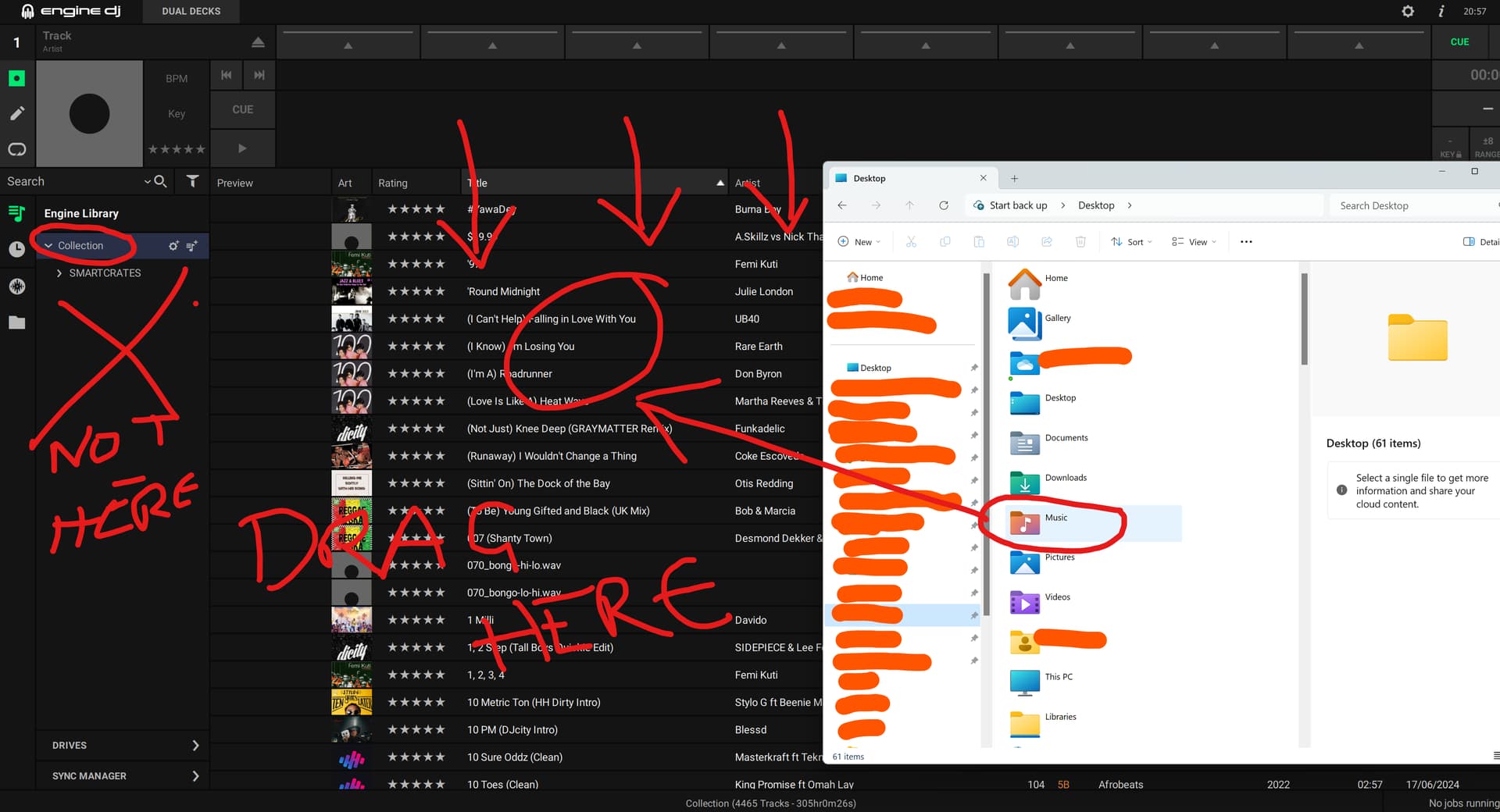
Okay. The way to do it
-
If you drag it into the Collection/Playlist tree (Left Panel) subplaylists will be created.
-
So simply drag the MUSIC directory into the Library, it will scan and only add new files.