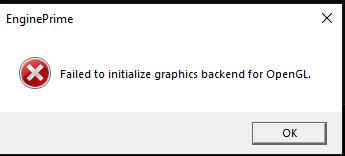
I use Engine DJ in a VM, so I can run it on my Linux box.
Was working fine with the previous version, but stopped working with the new version with the above error.
After some fiddling, the following steps got it working for me… but it’s slowwwwww.
Engine DJ 5.0.0 stopped launching for me in a Windows 10 QEMU/KVM VM after updating from the previous version (which worked fine in the same VM/environment).
Environment:
-
Linux host (Xubuntu 24.04)
-
QEMU/KVM via virt-manager
-
Windows 10 guest
-
Originally QXL/SPICE
-
Switched to Virtio video + SPICE OpenGL + 3D accel during troubleshooting
-
No GPU passthrough
Error shown:
Failed to initialize graphics backend for OpenGL.
Relevant log output included:
Failed to load opengl32sw
Failed to load and resolve WGL/OpenGL functions
Basic wglCreateContext gives version 1.1
OpenGL version too low
QRhiGles2: Failed to create context
Failed to create RHI (backend 2)
The VM only exposed:
Microsoft Basic Display Adapter
It appears Engine DJ 5.x now requires a newer Qt/OpenGL rendering path than previous versions.
What finally got it launching:
-
Downloaded Mesa3D Windows x64 release build
-
Took Mesa’s:
opengl32.dll
- Renamed it to:
opengl32sw.dll
- Copied it into:
C:\Program Files\Engine DJ\
Commands used:
copy opengl32.dll opengl32sw.dll
copy opengl32sw.dll "C:\Program Files\Engine DJ"
After that, Engine DJ 5 launches normally from the desktop icon.
However:
-
UI performance is now very slow/sluggish
-
waveform rendering is noticeably laggy
-
but the application is usable for library/export management
Looks like Engine DJ 5 is now depending on a more modern OpenGL stack, and Mesa software rendering is acting as a fallback workaround in a VM environment.
Interested to know if:
-
others running Engine DJ in VMs are seeing the same issue
-
there is a cleaner fix
-
proper VirtIO GPU drivers help
-
Denon/Engine changed something graphics-related in 5.0.0