I was bored this evening and had an idea…
I’ve been using iTunes as my main music library manager since my early Digital DJ days, mainly because it works with pretty much every DJ software platform. I manage and organize my music in iTunes and then import it into Engine DJ when I’m ready to use it for DJing.
Over the years, one of the most time-consuming parts has been genre tagging.
When you have a large music library, sitting in iTunes and going through tracks one by one, deciding on a genre and manually changing the tags can take forever. And for me, it never really made sense that a track had to belong to just one genre.
So I made my own music genre tagging tool in Python (with a massive help from chatGPT) today,to make that whole process much easier.
The idea is quite simple: instead of forcing every track into a single genre, the tool can assign multiple genre tags when they make sense.
For example, a track could be:
#Tech #Nu Disco #Organic House
I have also deliberately been using # in front of every genre. This is important because it prevents iTunes from treating the whole thing as one single genre called “Tech Nu Disco Organic House”.
The # essentially tells my system: these are separate tags.
So I can have:
#Tech
#Nu Disco
#Organic House
…all attached to the same track.
And this is where it becomes really useful with iTunes Smart Playlists.
If I have Smart Playlists for Tech House, Nu Disco and Organic House, the same track can automatically appear in all three playlists. I don’t have to choose one genre and lose the connection to the others.
It basically allows me to organize my music more like I actually think about it as a DJ.
A track isn’t always just one thing. It might be primarily Tech House, but also have elements of Nu Disco or Organic House. Being able to keep those different tags makes the library much more flexible.
The biggest benefit for me is simply saving a huge amount of time. Instead of spending hours sitting in iTunes manually tagging tracks this way, I can let the Python tool handle most of the repetitive work:
It loads a track → I pick genre(s) → and the moment I pick a genre, pop-up come up, asking if I want to add extra genre or save and continue to next track.
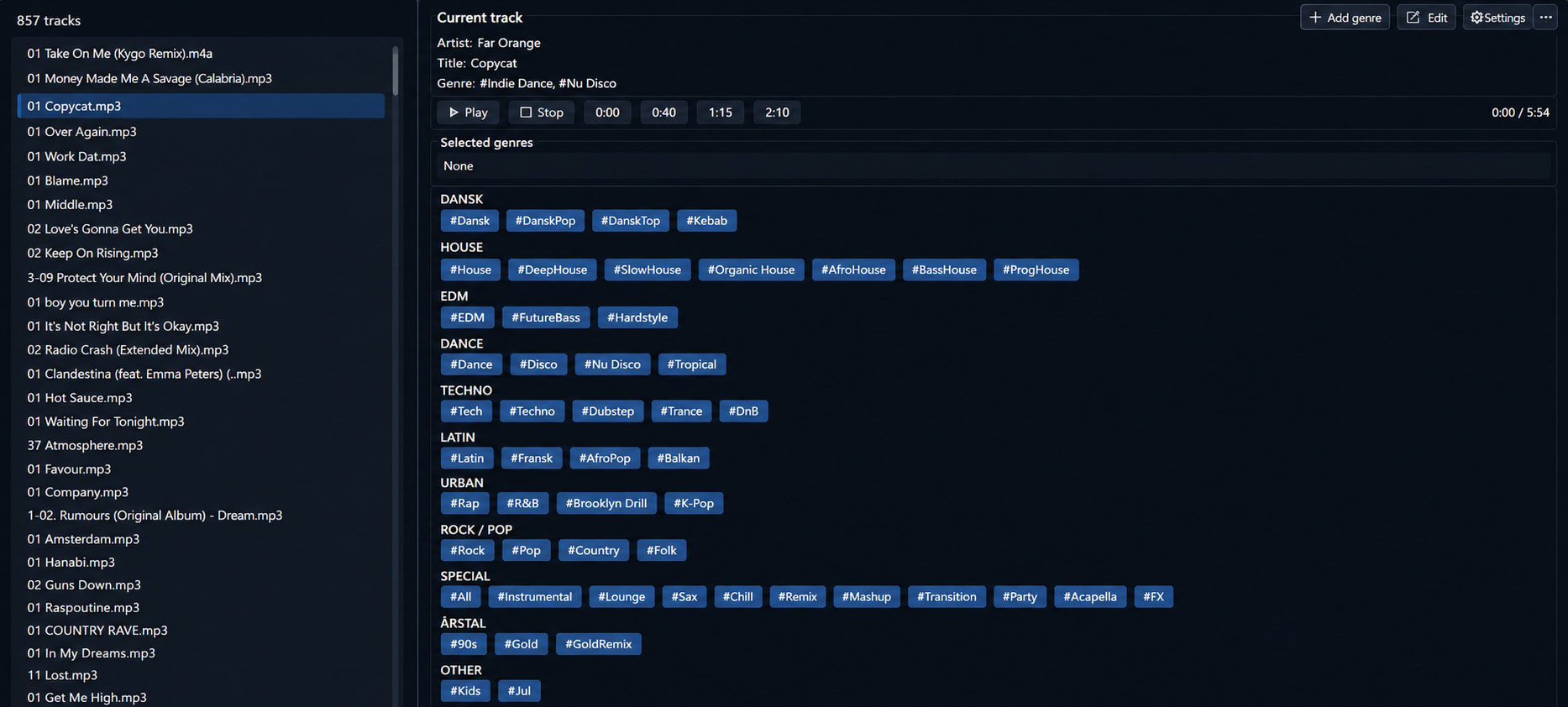
When done, it loads the next track without genre tags automatically.
When I then open iTunes I let iTunes Smart Playlists do the sorting for me.
And because I eventually import the library into Engine DJ, I still have the same structured music library available when I’m actually DJing.
So in the end, it’s a pretty simple idea:
Automate the boring part, keep the flexibility, and spend more time actually working with the music rather than organizing it.
And it works 
*Btw: I can drag the genres from one category to another, and they are not all out in the right categories yet, just in case you wonder the sorting 
