Hiii I heard that we can use crossfader contour to adjust the slope of crossfader curve by turning the knob to the left for a smooth fade (mixing). Question is : do I have to do something before turning this button on left side while mixing or just turn it because when I do a mix and use it, I see nothing change, nothing special. So may be I forgot to do something before using it. Thanks in advance!
Hello @djpatiecho Check in the settings if the contour lock is on.
Hiii I found nothing jn the settings about crossfader contour Help!
NoiseRiser and I have an X1800… Then it would be Utility > System > Contour Lock.
However, the Prime4 does not have an on/off for this. The X-Fader contour knob on the front of Prime4 is the only control you have and is always active. On the front you’ll also find the crossfader assignment switches.
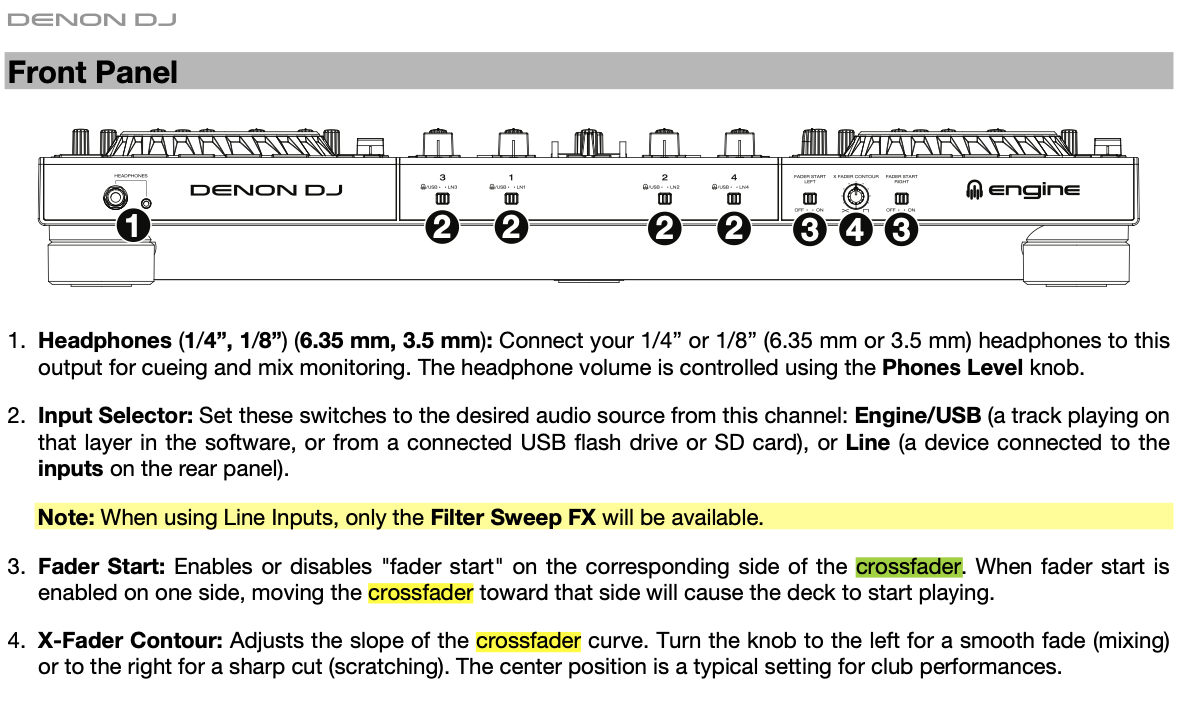
Thanks, But i did after reading the book and it doesn’t work. So it’s why I asked if I had to do something « BEFORE » turning crossfader contour from right to left when I do mix because it didn’t work!
Are you knowing what the change of different curves will sounds of?
A video will be helpful, record the sound mix when its set to the Left, Center and Right side
@djpatiecho trivial question: have you enabled the channels to be used by the crossfader? Use the selector 15 on page 9 of the user manual.
Did you figure this out? On my Prime 4 the contour knob does not have any effect either