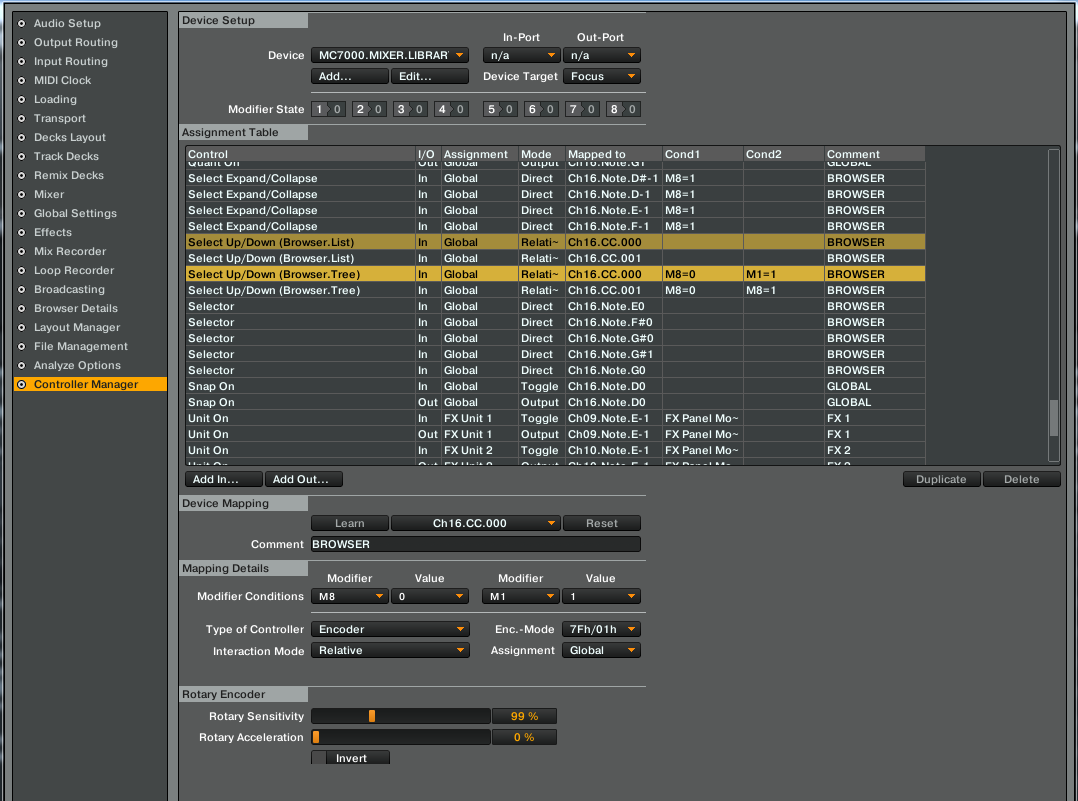
OK! Just quickly while I have a few minutes, this function is all tied into modifier 8 in the library mapping. As a temporary fix/workaround until I have the button names and functions correctly referenced for myself I did the following…
I don’t remember which one I changed but I will confirm once I go through my notes however, refer to the attached screenshot…the command that triggers the large browser window is the selected/expand on one of these, I simply changed the modifier conditions on the left and right encoders to the opposite of what they were. If m8=0 I changed it to m8=1 and vice versa, this stops the browser encoders from recognising the modifier 8 browser mod and let’s u scroll through your tracks in the track deck screen.
Have a look at your settings and see which ones are the opposite of the ones in my screenshot. Sorry for the rushed and completely rubbish information earlier, I will try to confirm all of this later and actually post a step by step for anyone’s future use!