I wouldn’t call it waffle. I’d call it sensible advice. For a beginner and home use, you might get away with it, but if you’re a working DJ don’t be a cheapskate. Get something mid-top spec that’s more capable and will last you longer.
I certainly wouldn’t say his advice is gospel, however there are plenty of people here who do see him as a thought leader / influencer and will likely follow his word.
Great summary!
Sharing this for our fellow nerds who may be interested in a deep dive.
Isn’t this just a newer way of saying reviewer/critic?
These days, I think it’s more of a newer way of saying “sales person” 
I’ve been using my Neo for a week now and to answer the initial question “have anybody tested the new macbook neo with engine dj“: Yes, and it works like a charm (even for me as a first-time mac user).
I recommend watching the whole video of Mixmaster G which is referenced by DJcityTV up here in the thread:

EngineDJ isn’t anywhere being resource-hungry right now so son’t worry about that. But will the Neo work out for us when either the workflow gets more complicated or Engine will claim more resources in the future when new features are introduced like variable/AI Beatgrids?
All the reviews out there basically come down to “The A18 Po only has 2 performance cores and 8gb of ram isn’t what you should get in 2026. So better go for XYZ”. But the reviewers don’t know our workflow. Sure at some point you can say that DJ (performance) software xyz won’t run when a ton of plugins are being used but I don’t see that case. I dont’t use Serato but I tried it on the Neo just for the sake of having it tested and I found no reason to complain. Yes, keyboard illumination is important and MagSafe actually can save your device when it get rough. But I’m focusing on hardware performance here and usage for library management.
What I didn’t know before: MacOS 26.4 uses right when it’s booted to the desktop approx. ~4GB of ram which is very little if you come from a windows background and very much if you come from a Linux background. Anyway you basically got ~4GB of memory free to use with other software.
In reality its a bit more. Most reviewers are like “then it’s swapping to the slow ssd!” but before swap is being used memory compression kicks in and although it won’t save the day it slightly improves the situation. And yes, then swap will be used which isn’t the end of the world when it happens at home during preperation. It may be different when we consider the “live out there” scenario.
Do this somple test: Boot your OS whatever it is (best is compare mac to mac, maybe a device from a colleague) measure memory usage, open up and use your whole software stack, measure memory usage again.
It’s less then 4GB? Well there you go. It’s near (or more then) 4GB? Now it depends on how patient you are with the software to do the job =)
Long story short: I bought the device mostly for library management and it’s capable of doing so which means it’s the right device for me. When I’m working on my library I’m not using any other software which runs in the background and I removed any clutter / bloatware I could find (which wasn’t much) not to get in my way.
Hope this helps =)
Dude loves the Neo so much he was compelled to sign up to this forum and post about it. 
Welcome to the forum @Jon_Artlen ! Great first post bro!
Apprechiate the warm welcome!
Been here for some time now, just lurking mostly =)

But here I think that the answers provided didn’t paint the whole picture.
Also I want to point out (and I emphasize that) that there isn’t much love for this product here… I’m a Linux user in my daily Life so it’s sort of a pain to deal with MacOS in my spare time. I went through different Linux solutions explained here in the forum and in other places but they didn’t feel (for me) as good as the toolset developed by MixMaster G which is MacOS only. Although it’s python in the backend?! But I digress… Back to topic!
From a hardware perspective I think that it suits the purpose described above. Nothing more, nothing less. And that’s what the majority of the reviews are like “IS IT CAPABLE OF THIS AND THAT“. It is. Disclaimer: I did apply this cooling solution:
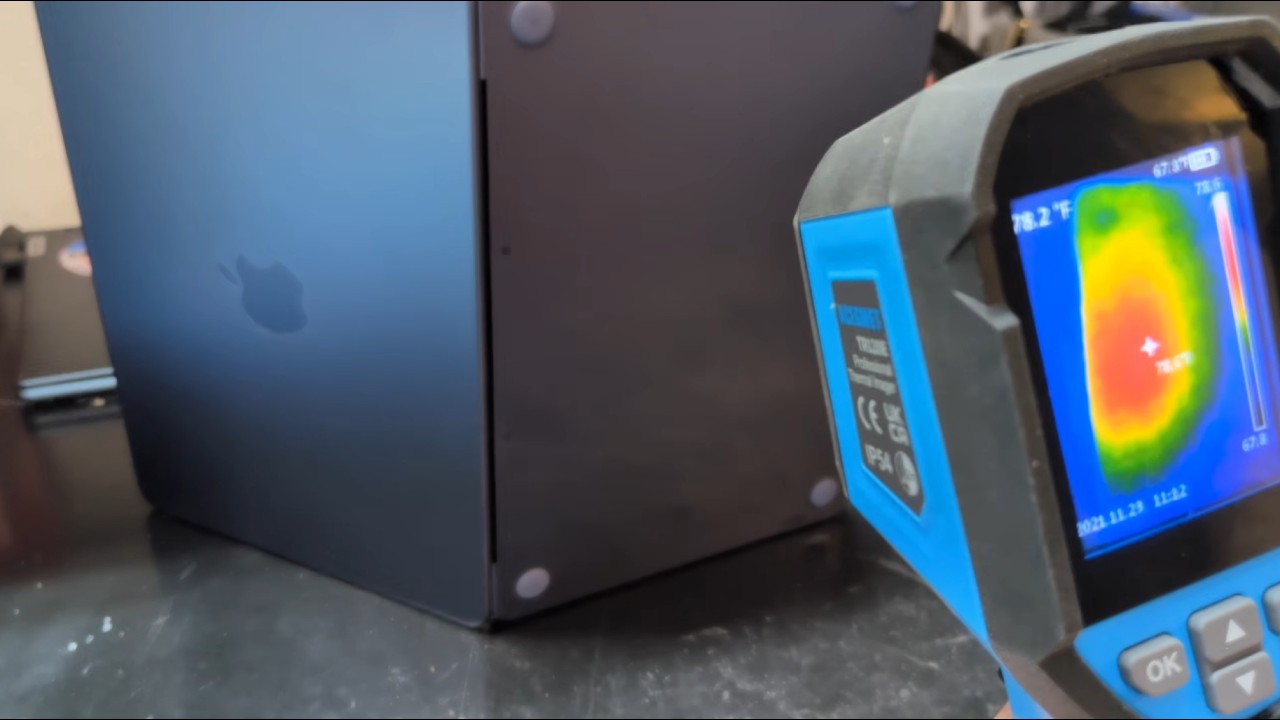
Because when you analyze larger playlists with Fluid Beatgrid set to auto or always - yes that takes some time and the bottom does get hand-warm. It doesn’t take forever but long enough to get a coffee. I didn’t compare analyzing performance, I just think this is a hardware flaw which is easy to fix.
Right now I can’t tell whether VirtualDJ actively uses the AppleSilicon Neural Engine in the CPU. I assume that right now the software part of fluid beatgridding isn’t optimized well and it’s performance may improve in the future. Let’s see.
Batch analyzing a large (+65k songs of various formats) collection. That’s where I’d like to see some tests with it.
Let’s up this to “re-analyzing”, since that’s where the bulk of the work seems to be. Add to that, stems separation 
Well it’s cool that you chimed in. You sound very technically savvy and seeing more tech people in the community gets me excited 
Thanks! Glad I found a topic to contribute to =)
@djdragon Ok, lets see… I re-analyzed a playlist of 375 tracks, 70% mp3, 20% aiff and 10% flac. Time: 1min 33 secs while cpu load was 100% during that time. I did it 3 times to warm up the cpu a bit as the first run was a bit quicker as thermal throttling kicked in later. But this isn’t about absolute numbers, it shall provide a general feeling how far the Neo is behind comparable hardware.
The interesting part is the memmory usage again. The memory usage difference between “Engine not running” and “Analyzing tracks is nearly complete” is only slightly above 1GB. Actually running the track analysis didn’t hardly add memory usage on top. Looked like this:
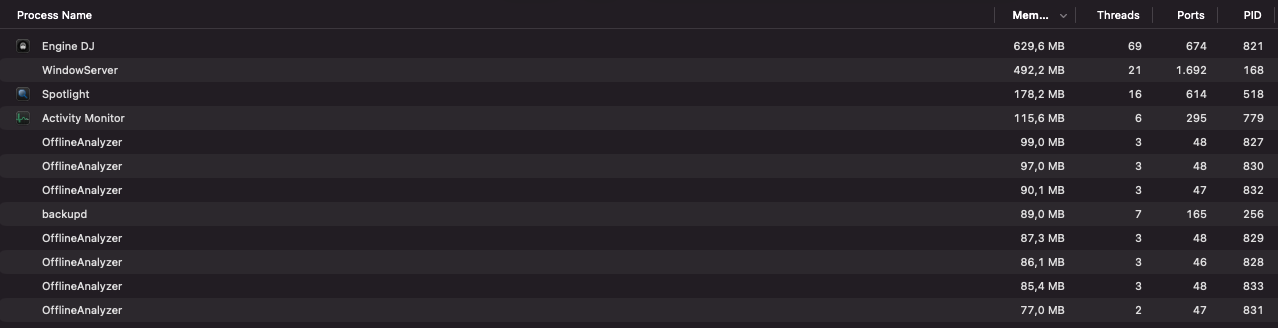
Track analysis creates 7 OfflineAnalyzer processes. This can either be a static number or be calculated the cpu cores or threads available +1. The A18 pro has 2 performance and 4 efficiency cores so it would add up. But it’s hard to tell on proprietary software… So around 90mb of memory for an analyze process.
Now for CPU load:
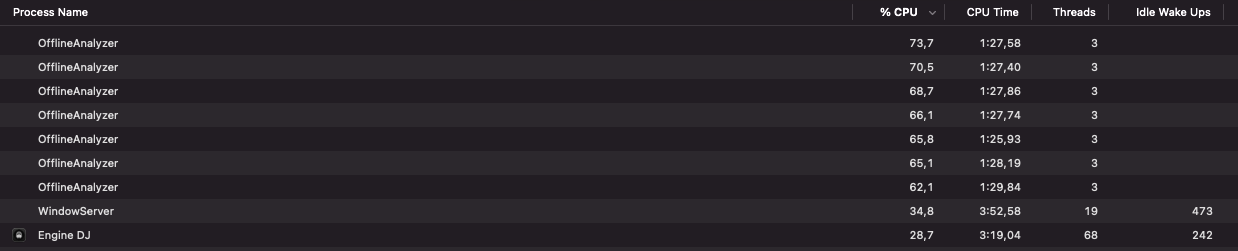
This was expected, the processes take whats available. Obviously the e-cores are used just as the p-cores are. Otherwise the usage (%) would be lower.
I assume the time taken scales in a linear way: double the tracks will take double the time. The analyze processes aren’t discarded, they are obviously fed track after track to analyze. They even live on after all tracks are completed and get purged only when Engine is closed.
Now for Stems Ok, 3 processes for stems and the Engine process (not in the screenshot). Maybe number of p-cores +1? Who knows… percentage used could indicate that those are scheduled only on p-cores. Or maybe the nural part of the SOC is used, I honestly don’t know what could indicate that.

Memory The processes are created with ~500mb of memory usage and take up to over 1,5GB of memory

Creating Stems for 100 Tracks in Engine (mostly mp3) did take 13min 40 secs. Compressed memory mostly was around 2,5GB and I ended up with 1GB of swap being used. But I don’t think that these processes were swapped out, that most likely was any random application running in the background not being used. Memory compression was higher then expected but on the other hand there was 1-2 gb of free memory (cached) all the time. MacOS seems to use complression very early to always have enough memory free/cached. It should take a bit of cpu load to compress / decompress memory pages but the Neo is as I read equipped with lpddr5 ram so the bandwidth should be there. CPU still should be the bottleneck with thermal throttling telling from how warm the bottom of the Neo became during the whole process.
To sum it up: The collection of djdragon including 65k+ tracks is best dealt with when you hit the “create stems” button and go on vacation for a week.
TY Jon, greatly appreciate you doing this. I don’t use stems but I appreciate the calculations.
The Neo music reanalysis is absolutely better than my daily driver of a 2018 Zenbook Core i5-8265U CPU 1.60GHz (1.80 GHz) with 8GB RAM.
The collection is on external Samsung T7 (432 tracks reanalyzed, 60% MP3 & 40% ALAC) time 06:22.57. Database Optimization (89,202 tracks) time 6:57.45. I’m sure there’s some thermal throttling on the external SSD, we all know that’s the SSD killer LOL.
Is the Neo impressive, yea. But it should be over my 9yo laptop
Will it sway me to getting one? Nope, I have no desire to go back to a Apple walled garden. It’s cute and Apple are trying to eat the current glaring void of mid-tier fragmented Windows laptops, I’m sure they’ll do fine and get new Apple users.