# Option to lock correctly beat gridded & analysed files
**URL:** https://community.enginedj.com/t/option-to-lock-correctly-beat-gridded-analysed-files/11598
**Category:** Engine PRIME
**Tags:** traktor, engine-prime
**Created:** [December 3, 2018, 12:49pm UTC](https://community.enginedj.com/t/option-to-lock-correctly-beat-gridded-analysed-files/11598 "2018-12-03T12:49:28Z")
**Posts on this page:** 13
**Page:** 1
### Author:  [@thisisian](https://community.enginedj.com/u/thisisian)
#### Post date: [December 3, 2018, 12:49pm UTC](https://community.enginedj.com/t/option-to-lock-correctly-beat-gridded-analysed-files/11598/1 "2018-12-03T12:49:28Z")
Hi. Could we have an option to lock a file once it’s been beat gridded please? I know i could stick a comment in the comments field (or another field i don’t use), but it would be handy if correctly analysed & gridded files could be shown as “complete” (maybe a small padlock symbol like traktor?) Cheers IAN
---
### Author:  [@SirReal](https://community.enginedj.com/u/SirReal)
#### Post date: [December 3, 2018, 5:50pm UTC](https://community.enginedj.com/t/option-to-lock-correctly-beat-gridded-analysed-files/11598/3 "2018-12-03T17:50:41Z")
+1 for this. I’ve been slowly adding my collection into engine prime and it would be AWESOME to have a visual representation to let me know that I’ve already checked the grid/BPM of certain tracks. It was a very handy simple feature that Traktor uses.
---
### Author:  [@mufasa](https://community.enginedj.com/u/mufasa)
#### Post date: [December 3, 2018, 6:42pm UTC](https://community.enginedj.com/t/option-to-lock-correctly-beat-gridded-analysed-files/11598/4 "2018-12-03T18:42:52Z")
Isn’t this what “analyse” and “reanalyse” is for?
I could be wrong, but I thought “analyse” skips tracks that are already analysed whilst “reanalyse” forces already analysed track to be reanalysed.
That was my impression.
---
### Author:  [@SirReal](https://community.enginedj.com/u/SirReal)
#### Post date: [December 3, 2018, 7:11pm UTC](https://community.enginedj.com/t/option-to-lock-correctly-beat-gridded-analysed-files/11598/5 "2018-12-03T19:11:32Z")
Yes BUT just because a track has been analyzed doesn’t mean that the BPM & grid are set correctly or that I’ve set any cue points or loops. Some way to add a “flag” to a track seen in the browser to show that the tracks has been vetted and set to play would be great.
---
### Author:  [@mufasa](https://community.enginedj.com/u/mufasa)
#### Post date: [December 3, 2018, 7:39pm UTC](https://community.enginedj.com/t/option-to-lock-correctly-beat-gridded-analysed-files/11598/6 "2018-12-03T19:39:14Z")
Ok I get you. It’s from a library management perspective right.
Whilst locking a track like in Serato/Traktor is decent enough it doesn’t give any valuable information as to what changes have been made to the track. It only tells , you 've done something to the track.
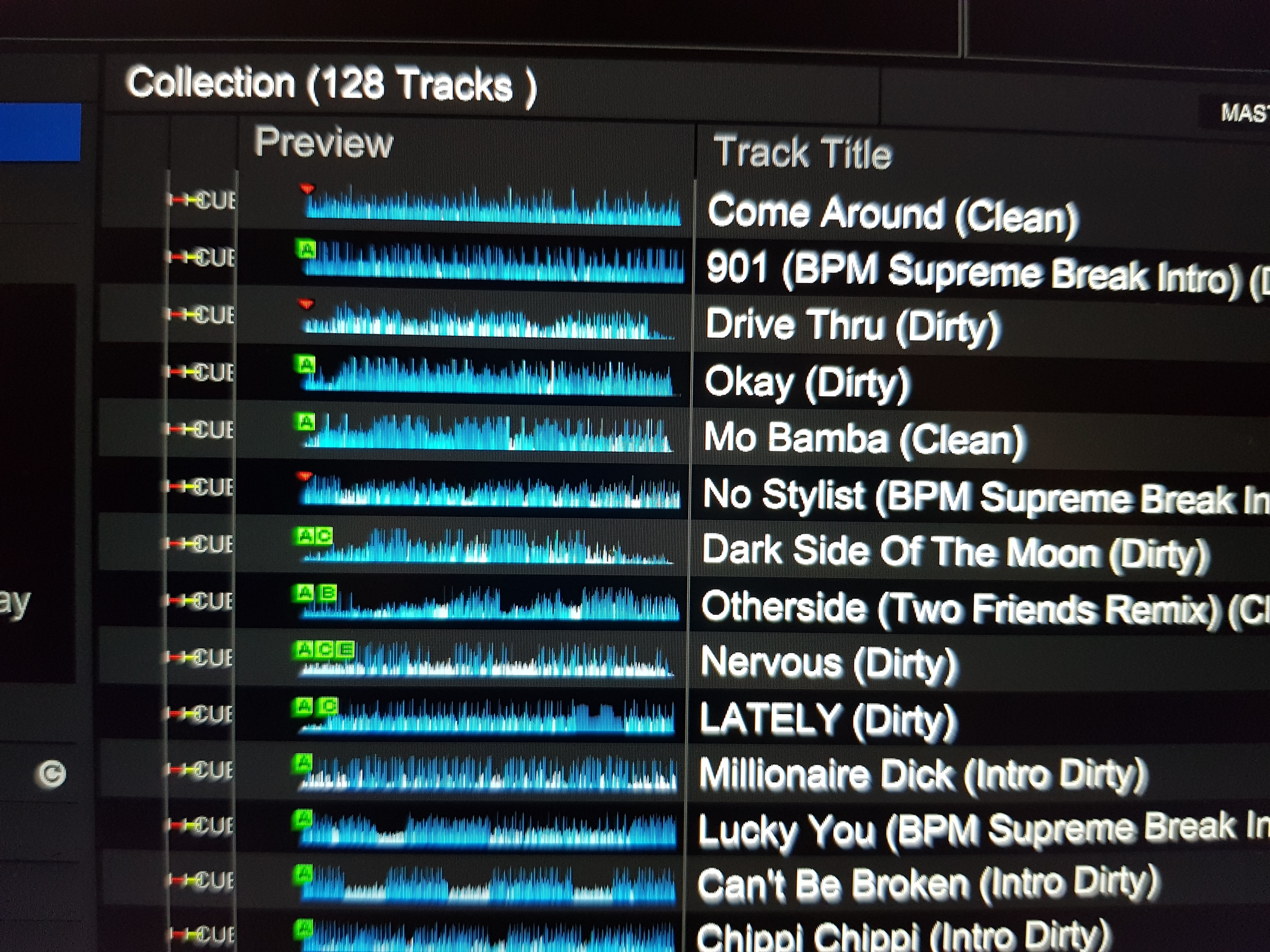
What i will find helpful is a separate column that shows the attributes of the each track with a wave overview and icons.
That way one can easily spot tracks with cues, beatgrids, saved loops etc without needing to load the track.
---
### Author:  [@SirReal](https://community.enginedj.com/u/SirReal)
#### Post date: [December 3, 2018, 7:57pm UTC](https://community.enginedj.com/t/option-to-lock-correctly-beat-gridded-analysed-files/11598/7 "2018-12-03T19:57:27Z")
Even better but much more involved to initiate.
---
### Author:  [@Sydes](https://community.enginedj.com/u/Sydes)
#### Post date: [December 9, 2018, 7:54am UTC](https://community.enginedj.com/t/option-to-lock-correctly-beat-gridded-analysed-files/11598/9 "2018-12-09T07:54:41Z")
+1 x 1000… This should really be implemented together with options that set what to analyse…
---
### Author:  [@LeoDixon](https://community.enginedj.com/u/LeoDixon)
#### Post date: [December 10, 2018, 12:27pm UTC](https://community.enginedj.com/t/option-to-lock-correctly-beat-gridded-analysed-files/11598/10 "2018-12-10T12:27:43Z")
I agree! I have a lot of good gridding made in traktor to all of my songs. To redo everything and then don’t know if it’s going to keep that way, is a headache.
---
### Author:  [@optunist](https://community.enginedj.com/u/optunist)
#### Post date: [November 17, 2020, 11:27pm UTC](https://community.enginedj.com/t/option-to-lock-correctly-beat-gridded-analysed-files/11598/11 "2020-11-17T23:27:50Z")
Old thread - sorry… Is this implemented yet?
---
### Author:  [@DjAj](https://community.enginedj.com/u/DjAj)
#### Post date: [November 18, 2020, 7:19am UTC](https://community.enginedj.com/t/option-to-lock-correctly-beat-gridded-analysed-files/11598/12 "2020-11-18T07:19:33Z")
> [@optunist](#):
>
> Is this implemented yet?
Yes, in Engine Prime latest version it is possible to block the editing of the grid. There is a padlock symbol that you can click on and lock the grid. Of course, you can always change Hotcues and loops.
---
### Author:  [@Mark3406](https://community.enginedj.com/u/Mark3406)
#### Post date: [November 18, 2020, 7:56am UTC](https://community.enginedj.com/t/option-to-lock-correctly-beat-gridded-analysed-files/11598/13 "2020-11-18T07:56:33Z")
Is it possible to batch lock grids, I cant seem to find this option
---
### Author:  [@mufasa](https://community.enginedj.com/u/mufasa)
#### Post date: [November 18, 2020, 8:42am UTC](https://community.enginedj.com/t/option-to-lock-correctly-beat-gridded-analysed-files/11598/14 "2020-11-18T08:42:16Z")
No batch lock or unlock.
---
### Author:  [@pim\_pam](https://community.enginedj.com/u/pim_pam)
#### Post date: [September 28, 2024, 12:37pm UTC](https://community.enginedj.com/t/option-to-lock-correctly-beat-gridded-analysed-files/11598/15 "2024-09-28T12:37:44Z")
I just noticed that locking the tracks from prime4 with the PC as source does not lock them in engine and we can’t lock them in batches either c est vraiment de la MERDE engine