I am wondering if any of you DJ library wizards can offer me some tips on how to adapt to the Engine OS workflow.
I recently picked up a pair of SC6k and am loving them.
I have read through the forums extensively and just so I am absolutely clear:
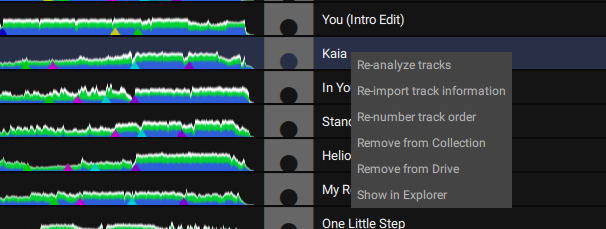
There is no way to use the Engine DJ OS to remove files stored on my Mac HD from the hard drive, OTHER than right clicking on the track, opening “show in finder”, and then moving the file to the recycle bin. Is this correct?
Previously I used traktor as my central library for managing music. In traktor, there is a “remove from hard drive” option when you right click on a track in the library. It’s handy, but it’s kind of slow to load each track to a deck and then scrub through to preview.
I really like how snappy the Engine OS is for previewing music. Its great for sorting tons of new files into playlists/categories.
I produce a lot using an older computer, so hard drive space is scarce. Going through mine and my friends many bounces of their .wavs as we work through iterations of their workflow (this one is more compressed, this one the chords are different etc) eats up space FAST. So it’s nice to be able to get rid of stuff asap to keep the workspace clean.
I’d love to use engine for this, and I feel as though there is almost some workaround to figure it out. One of the main reasons I’m keen on the software is that my favourite way to reference “nearly finished” productions is to load them onto players and mix them within their genre on decks. It ensures the “feel” is there.
When you click on a track in your ‘main’ tracklist, not the tree view on the left, providing the track is not loaded to a deck it can be removed from drive.
@mufasa has a great video which may help you out on some of the finer aspects.
Tracks can be removed from both collection and drive if you navigate by drives and not by main collection. Expand drivers, click on your local drive then collection/playlists and right click & remove from drive
I am sorting music on the internal SATA drive while mixing. Using the SC6k player I create a playlist named “DELETE”. Stuff I want to remove (would be really cool to be able to delete files on players! [and also edit metadata!!]), I drag and drop into the DELETE playlist.
When I access the SATA via computer mode, I navigate to the DELETE playlist through the DRIVES column. I can right click on it to “remove from drive”. But that will only remove the files from the SATA drive and not the engine collection on the machd?
Am I supposed to then use the sync manager to synchronize the changes made on the SATA drive with the Engine collection on computer hd? Therefore it will also create the playlist “DELETE” on my macchd Engine collection. From there I can remove it on the SATA drive, “remove from drive”. And then again find it in Engine collection and “remove from drive”.
Hope this makes sense! Trying to get a handle on how to use Engine as my main music library but having a hard time understanding the sync manager.