# My iTunes library is not showing in Engine Desktop
**URL:** https://community.enginedj.com/t/my-itunes-library-is-not-showing-in-engine-desktop/36452
**Category:** Engine DJ (Mac & PC)
**Tags:** library, macos, itunes, engine-dj
**Created:** [October 24, 2021, 10:06am UTC](https://community.enginedj.com/t/my-itunes-library-is-not-showing-in-engine-desktop/36452 "2021-10-24T10:06:30Z")
**Posts on this page:** 8
**Page:** 1
### Author:  [@fardband](https://community.enginedj.com/u/fardband)
#### Post date: [October 24, 2021, 10:06am UTC](https://community.enginedj.com/t/my-itunes-library-is-not-showing-in-engine-desktop/36452/1 "2021-10-24T10:06:31Z")
I have upgraded Engine Desktop from v1.6.1 to v2.0.0 on my MacBook Pro and now my iTunes library is not showing where I have all my music sorted. It also doesn’t work if I hit the iTunes Library Update button.
I have upgraded to Engine Desktop v2.0.1 and the same thing keeps happening.
Does anyone know how to fix it?
---
### Author:  [@Kuchen89](https://community.enginedj.com/u/Kuchen89)
#### Post date: [October 25, 2021, 9:48am UTC](https://community.enginedj.com/t/my-itunes-library-is-not-showing-in-engine-desktop/36452/2 "2021-10-25T09:48:21Z")
i know this problem, too. under 2.0.0 just the first 30% (?) of playlist were importet.
now with 2.0.1 nothing happens after hit “update itunes” and my songs were loaded.
---
### Author:  [@mufasa](https://community.enginedj.com/u/mufasa)
#### Post date: [October 25, 2021, 10:41am UTC](https://community.enginedj.com/t/my-itunes-library-is-not-showing-in-engine-desktop/36452/3 "2021-10-25T10:41:50Z")
I just tested on windows
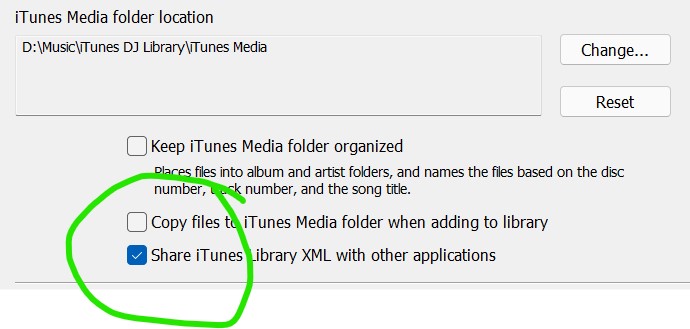
1. check that this is enabled
1. Close Itunes
2. Engine DJ settings
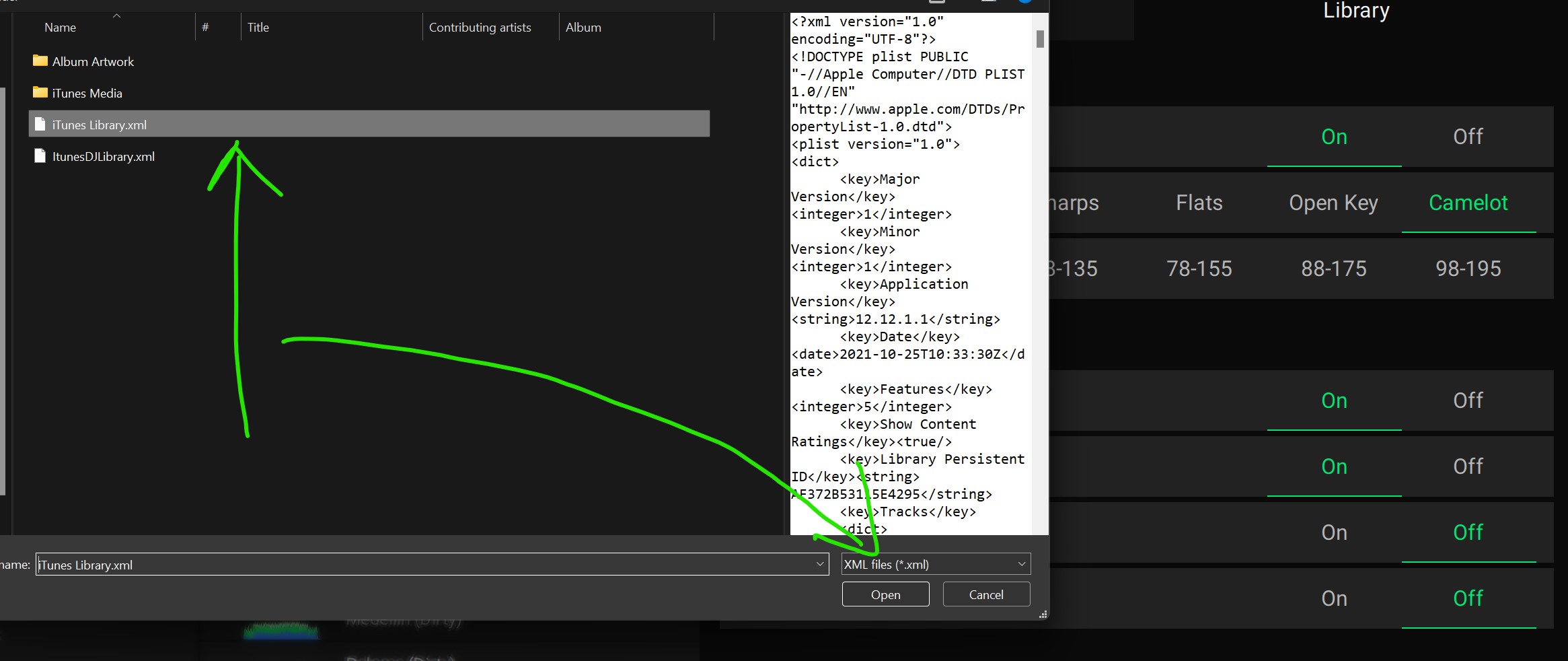
1. Refresh Collection
It works consistently here
1. I’m able to refresh itunes library
2. If i add new tracks to itunes and repeat the process, the new tracks are added to Engine DJ main collection
3. [Known limitations still exists as reported here](https://community.enginedj.com/t/update-existing-crate-and-playlist/14430)
Possible troubleshooting ideas
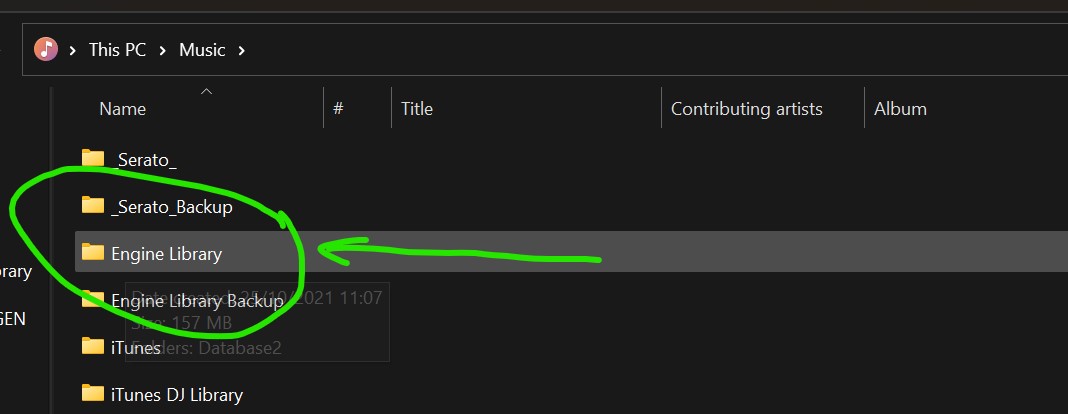
1. Archive your Engine DJ Folder by renaming it to something else eg “Engine Library 2021 backup”
---
### Author:  [@fardband](https://community.enginedj.com/u/fardband)
#### Post date: [October 25, 2021, 11:11am UTC](https://community.enginedj.com/t/my-itunes-library-is-not-showing-in-engine-desktop/36452/4 "2021-10-25T11:11:19Z")
Thanks.
I’ve tried all of this and it still doesn’t work.
---
### Author:  [@fardband](https://community.enginedj.com/u/fardband)
#### Post date: [November 10, 2021, 8:47pm UTC](https://community.enginedj.com/t/my-itunes-library-is-not-showing-in-engine-desktop/36452/5 "2021-11-10T20:47:17Z")
I have upgraded to Engine Desktop v2.0.2 and the same thing keeps happening.
Does anyone know how to fix it?
---
### Author:  [@fardband](https://community.enginedj.com/u/fardband)
#### Post date: [December 10, 2021, 10:23pm UTC](https://community.enginedj.com/t/my-itunes-library-is-not-showing-in-engine-desktop/36452/6 "2021-12-10T22:23:41Z")
I have created a new macOS user and added songs and albums to the itunes library for that user.
Next, I open Engine DJ and it does show me the iTunes library with the new music added.
Conclusion: I think the original problem is in my iTunes library. In the .xml you export. I’ll have to check that out.
---
### Author:  [@fardband](https://community.enginedj.com/u/fardband)
#### Post date: [August 25, 2022, 11:56am UTC](https://community.enginedj.com/t/my-itunes-library-is-not-showing-in-engine-desktop/36452/7 "2022-08-25T11:56:27Z")
> [@fardband](#):
>
> now my iTunes library is not showing where I have all my music sorted.
I upgraded to **Engine Desktop v2.3** and my problem is fixed. Now my iTunes library is showing where I have all my music sorted.
This was the bug they fixed: “Fixed an issue where an iTunes library would fail to import fully if the library contained a Smart List and a Playlist with the same name.”
Many thanks. I am very happy about it.
---
### Author:  [@system](https://community.enginedj.com/u/system)
#### Post date: [August 26, 2022, 11:56am UTC](https://community.enginedj.com/t/my-itunes-library-is-not-showing-in-engine-desktop/36452/8 "2022-08-26T11:56:55Z")
This topic was automatically closed 24 hours after the last reply. New replies are no longer allowed.