# Engine in windows complaining about the filesystem on my C: drive
**URL:** https://community.enginedj.com/t/engine-in-windows-complaining-about-the-filesystem-on-my-c-drive/70979
**Category:** Engine DJ (Mac & PC)
**Created:** [September 22, 2026, 5:15pm UTC](https://community.enginedj.com/t/engine-in-windows-complaining-about-the-filesystem-on-my-c-drive/70979 "2026-09-22T17:15:22Z")
**Posts on this page:** 5
**Page:** 1
### Author:  [@PuppyCanyon](https://community.enginedj.com/u/PuppyCanyon)
#### Post date: [September 22, 2026, 5:15pm UTC](https://community.enginedj.com/t/engine-in-windows-complaining-about-the-filesystem-on-my-c-drive/70979/1 "2026-09-22T17:15:22Z")
I installed the latest Engine on my windows desktop, and when i open it it complains that the disk has a format that won’t be supported by engineos devices.
Once I click into it, I see that the C: and D: drives (fixed, internal ssds on my desktop, not removable) are marked with a warning flag because they’re running NTFS.
Is there any way to get engine to not complain about that? I’m never going to be plugging those drives into my mixstream or future devices, they’re just the storage drives where all my mp3’s and flacs are kept, so I don’t understand why Engine feels like it has to warn me about it.
Any suggestions?
---
### Author:  [@djliquidice](https://community.enginedj.com/u/djliquidice)
#### Post date: [September 22, 2026, 8:59pm UTC](https://community.enginedj.com/t/engine-in-windows-complaining-about-the-filesystem-on-my-c-drive/70979/2 "2026-09-22T20:59:39Z")
This is a valid complaint, and there should be no reason why your internal, SATA-connected drives should present warnings. I mean, this doesn’t happen on MacOS with internally connected mounted volumes, but it does with externally connected mounted volumes.
---
### Author:  [@PuppyCanyon](https://community.enginedj.com/u/PuppyCanyon)
#### Post date: [September 23, 2026, 1:37am UTC](https://community.enginedj.com/t/engine-in-windows-complaining-about-the-filesystem-on-my-c-drive/70979/3 "2026-09-23T01:37:14Z")
what is odd is that on my primary desktop running windows 11, it doesn’t do that, whereas on my other computer running windows 10 it does. Makes me think it’s a bug or compatibility issue.
---
### Author:  [@Reese](https://community.enginedj.com/u/Reese)
#### Post date: [September 29, 2026, 7:24pm UTC](https://community.enginedj.com/t/engine-in-windows-complaining-about-the-filesystem-on-my-c-drive/70979/4 "2026-09-29T19:24:26Z")
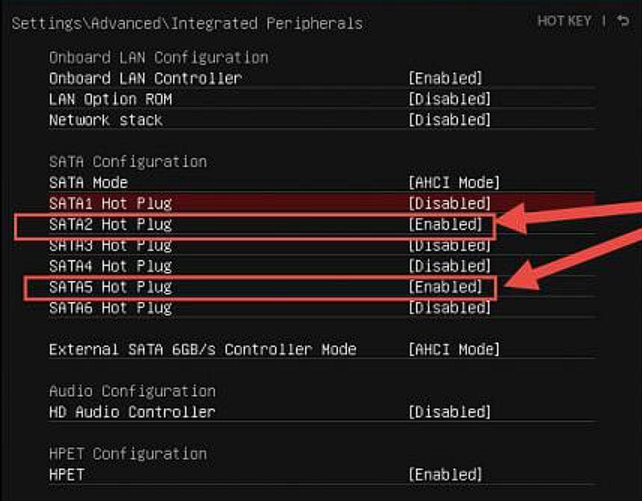
I think this happens when a drive is marked as hot-plug storage in the bios. Even internal SATA drives are in some bioses.
---
### Author:  [@djliquidice](https://community.enginedj.com/u/djliquidice)
#### Post date: [September 30, 2026, 9:31pm UTC](https://community.enginedj.com/t/engine-in-windows-complaining-about-the-filesystem-on-my-c-drive/70979/5 "2026-09-30T21:31:46Z")
Nice one mate!